Author: nabaliwork@gmail.com

  • Digital Marketing for Home Service Businesses: Where to Start

    Digital Marketing for Home Service Businesses: Where to Start

    Home service businesses need a steady flow of relevant inquiries, but marketing can become scattered quickly. A roofing contractor may be managing a website, a Google Business Profile, search ads, reviews, social posts, and a dozen directories without knowing which activities lead to booked work.

    The most useful starting point is not another channel. It is a clear understanding of your services, service area, capacity, and how customers contact you. Once those basics work, marketing becomes easier to measure and improve.

    This guide offers a practical starting sequence for moving companies, cleaners, HVAC contractors, window cleaners, flooring specialists, and other local service providers.

    1. Define the Jobs and Locations You Actually Want

    List the services you want to sell, the neighborhoods or cities you can reliably serve, and the jobs your team can fulfill profitably. Distinguish high-priority services from occasional work.

    For example, a cleaning company may prioritize recurring residential work while accepting selected commercial projects. Those audiences may need different landing pages and different messages.

    Avoid advertising everywhere simply to increase traffic. Inquiries outside your service area or for services you do not offer create unnecessary work.

    2. Make Your Website Ready for Inquiries

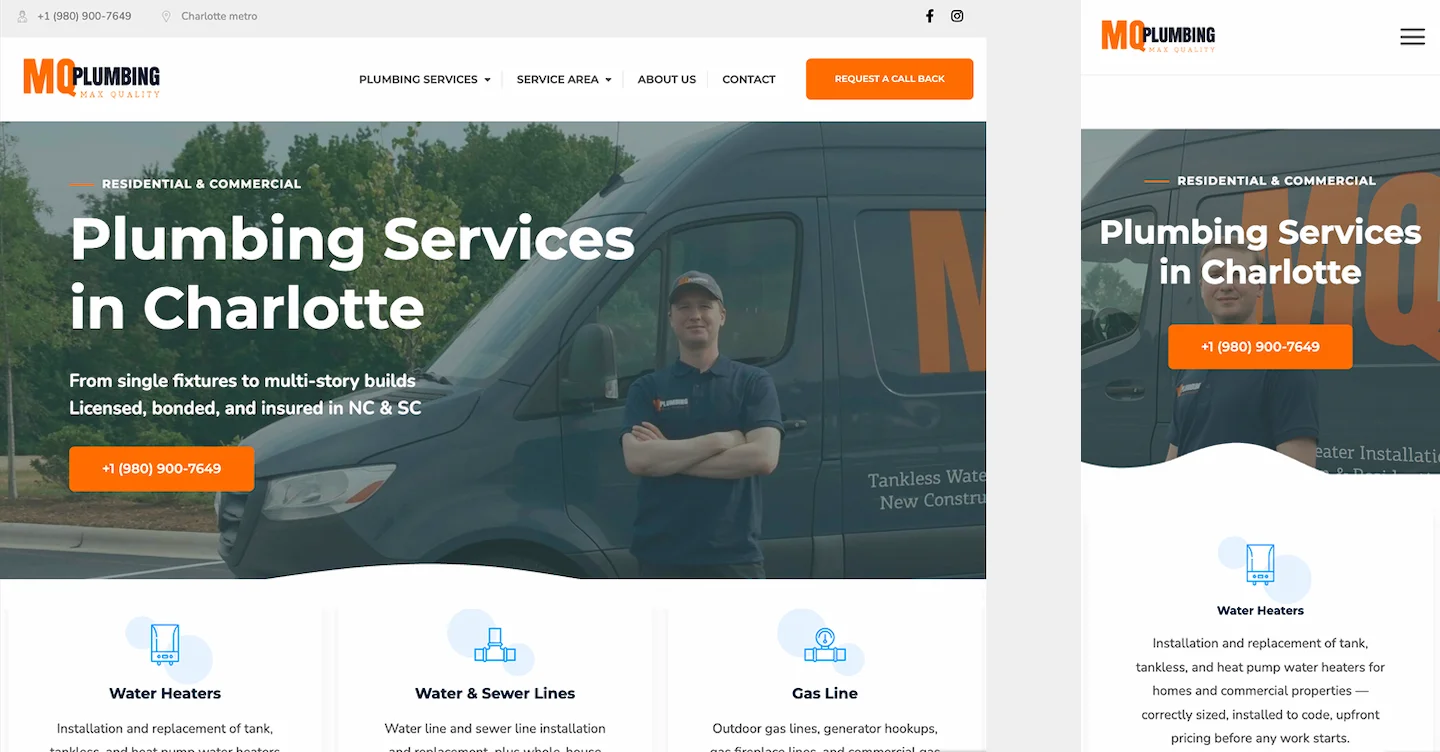
    Your website is the destination for many searches, ads, and referrals. Each important service deserves a clear explanation, authentic photos where available, a genuine service area, and an obvious contact action.

    Test the site on a phone. Tap every call button, submit a marked test form, and confirm the message arrives in the correct inbox or customer management system. Make sure visitors understand what happens after they request an estimate.

    A polished design is useful, but a working lead path matters more than animations or decorative sections.
    Home service website with clear contact options

    3. Set Up a Trustworthy Google Business Profile

    For eligible businesses, an accurate Google Business Profile helps customers find basic information and contact details. Verify the real business name, relevant categories, phone number, website, hours, and service-area settings.

    Use authentic photos of staff, vehicles, equipment, and completed work when you have permission. Ask customers for honest reviews without incentives, selective filtering, or pressure.

    Do not create fictional offices or extra profiles for cities where you do not have a qualifying location. Local visibility is not guaranteed by completing a checklist.

    4. Build Service Pages Before Publishing Dozens of Articles

    Start with pages for the services customers actually search for. A dryer vent cleaning page should explain the service, common reasons customers request it, the area covered, and how to book or ask a question.

    Useful local content can support these pages, but avoid nearly identical city pages that only swap place names. Write for real customer needs and link related pages naturally.

    Technical basics also matter: pages should be accessible to search engines, load reasonably well, and avoid broken links or confusing redirects.

    5. Use Google Ads When the Lead Process Is Ready

    Search advertising can help reach people looking for a service now, provided targeting and ads match genuine customer intent. Start with a focused set of services and locations rather than spreading a limited budget across every offering.

    Review search terms where available, add appropriate negative keywords, and check location settings. Send ads to relevant landing pages rather than a generic page that makes visitors search again.

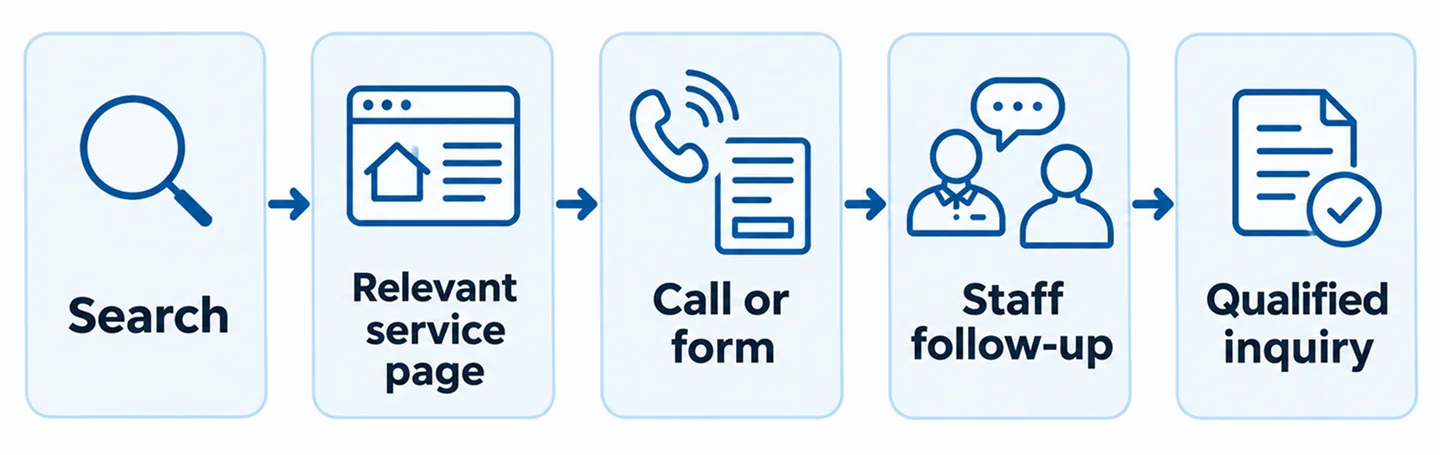
    Before scaling, verify that calls and forms reach your team. More traffic cannot repair missed calls or a broken form.
    Illustrative local search to customer inquiry journey

    6. Treat Reviews and Referrals as an Ongoing Process

    A simple, ethical review request after completed work can make it easier for customers to share genuine experiences. Reply professionally where appropriate and protect customer privacy.

    Referrals also depend on the service experience. Make it easy for satisfied customers to find your correct website and contact details, and ensure staff know how to handle referred inquiries.

    Do not buy reviews, offer rewards in exchange for positive ratings, or publish testimonials that customers did not approve.

    7. Choose Social Channels Based on Available Content

    Social platforms can show real work, answer common questions, and remind past customers about services. A contractor with a library of project photos may have a practical starting point even without professionally produced videos.

    Publish content that reflects the actual business: project explanations, seasonal reminders, team introductions, and useful service tips. Obtain permission before showing clients, addresses, or private property details.

    Posting every day is not automatically better. Choose a sustainable schedule and evaluate whether content supports trust and inquiries, rather than chasing views alone.

    8. Track Real Leads, Not Just Clicks

    Define what counts as a meaningful inquiry. A form submission delivered to staff is different from a button click; an answered customer call is different from a tap on a phone link.

    Set up analytics and advertising conversion events carefully, and avoid double-counting. Compare marketing reports with actual call logs, forms, and booked jobs when records are available.

    Look for missed calls, delayed responses, and requests outside your service scope. These operational problems can make an otherwise relevant campaign appear unsuccessful.

    9. Improve Follow-Up Before Increasing Spend

    Customers may contact several providers. Give staff a consistent process for answering calls, returning missed calls, and responding to online inquiries.

    A simple shared inbox, customer management system, or intake log can help prevent lost requests. Automation can acknowledge receipt or route information, but should not falsely promise that a person has reviewed or confirmed a booking.

    Track how often a valid inquiry receives a response and whether it becomes a quote or job. Use those observations to improve operations before expanding acquisition.

    Home service business team reviewing customer inquiries

    A Practical First 30 Days

    Week 1: confirm priority services, service area, business contact details, and the condition of the website. Test calls and forms from a phone.

    Week 2: review the Google Business Profile and improve the most important service pages. Add authentic photos and clear next steps.

    Week 3: establish lead tracking and staff follow-up. If appropriate, prepare a narrowly targeted advertising test with a relevant landing page.

    Week 4: review actual inquiries, identify missed or irrelevant leads, and decide what to fix next. Document changes so the team can distinguish improvements from normal demand fluctuations.

    Common Mistakes to Avoid

    Trying five channels before the website works, targeting locations you cannot serve, copying generic service descriptions, ignoring missed calls, and measuring success only through clicks are common avoidable mistakes.

    Another mistake is assuming a single platform will solve everything. Strong marketing connects accurate business information, useful pages, qualified traffic, and reliable follow-up.

    Frequently Asked Questions

    What should a new home service business do first?

    Define its real services and service area, make sure the website and contact methods work, and set up accurate local business information before expanding into additional channels.

    Is SEO or Google Ads better for home services?

    It depends on urgency, demand, the website, and operational capacity. SEO supports longer-term discoverability, while Google Ads may help test or reach immediate search demand. Neither guarantees leads.

    Do I need to post on social media every day?

    No. Consistent, authentic content that customers find useful is generally a more practical goal than posting for frequency alone.

    How can I tell which marketing channel brings customers?

    Use appropriate call and form tracking, compare with intake records, and connect inquiries to booked work when possible. Be careful about duplicate conversions and incomplete attribution.

    Build a Marketing System, Not a Collection of Tactics

    The strongest starting point for a home service business is a clear service offer, an accurate local presence, a functional website, and a team ready to respond to inquiries. From there, SEO, Google Ads, reviews, and social content can be developed in a deliberate order.

    Nabali Development helps US service businesses improve their websites, local visibility, and lead generation. If you want to identify the next practical improvement, request a preliminary website and marketing review.

    Build a Better Lead Generation Foundation

    Request a preliminary review of your website and marketing setup.

    REQUEST A FREE REVIEW
  • How to Turn More Website Visitors Into Customer Inquiries

    How to Turn More Website Visitors Into Customer Inquiries

    Website traffic is not the same as business growth. A visitor may read your service page, compare options, and leave without calling or completing a form. That does not automatically mean the traffic was poor. It may mean the website did not answer a key question or make the next step easy.

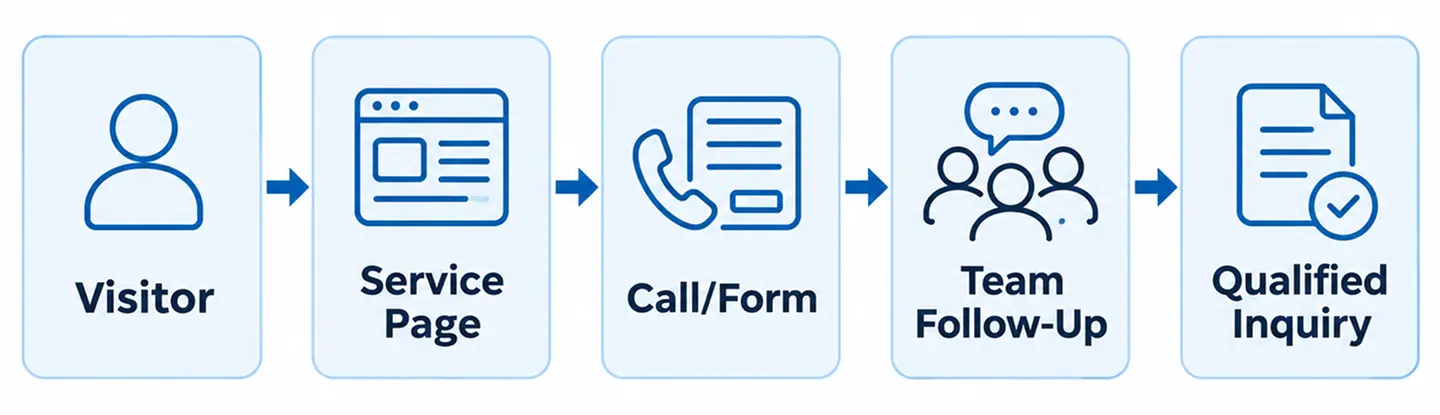
    For local service businesses, the goal is usually a useful conversation: an estimate request, a call about a specific job, or a consultation with a potential customer. The best way to improve inquiries is to examine the entire journey, from the first page view to the moment your team responds.

    This guide focuses on practical conversion improvements you can measure. It is different from a general website-building guide: the emphasis here is on diagnosing existing visitor behavior and turning legitimate interest into completed contact requests.

    1. Define What Counts as a Qualified Inquiry

    Before changing buttons or headlines, decide what an inquiry means. A completed contact form is not necessarily a qualified opportunity. A wrong-number call, job application, or request for a service outside your coverage area should be categorized separately.

    Agree on a simple definition with the people who answer calls and emails. Record the service requested, service area, contact method, and whether the business could reasonably help. This makes it possible to distinguish a marketing problem from a lead-handling problem.

    2. Check the Promise on Your First Screen

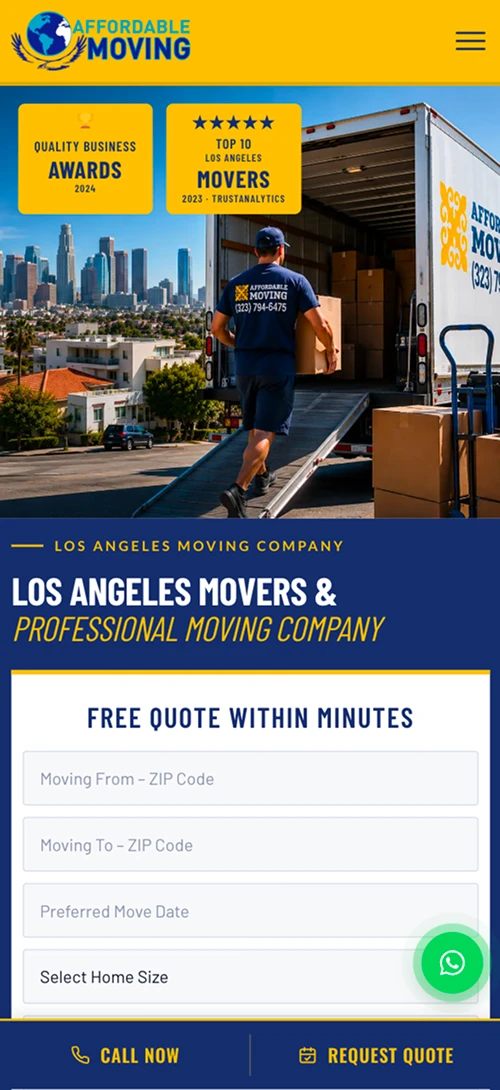
    The top of a landing page should tell visitors what the business does, who it helps, and where it works. Avoid headlines that could describe any company. A moving company, for example, should not make visitors search through several paragraphs to learn whether it handles local moves.

    Use one primary next step, such as Request an Estimate or Call Our Team. The wording should match what happens next. If a form only requests a callback, do not label the button Book Now.

    3. Match Each Service Page to Customer Intent

    People who search for a particular service expect a page about that service. A generic homepage may force them to work too hard to find details. Review the pages receiving visitors from organic search and advertising, then check whether each page clearly answers the relevant questions.

    Useful details can include the service process, genuine service areas, common limitations, relevant photographs, and how to request help. Keep navigation simple and link related services where doing so genuinely helps visitors.

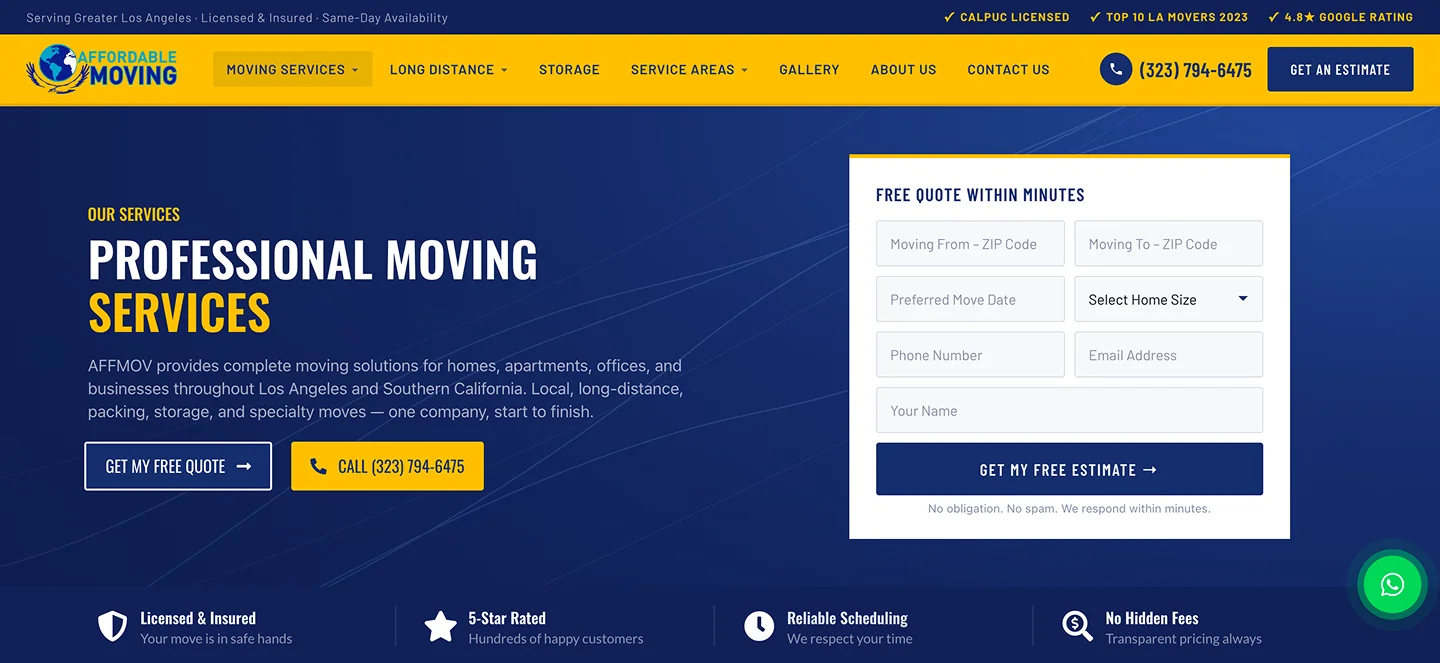
    Service page with clear description and inquiry button.

    4. Remove Friction From Forms

    Long forms can discourage visitors who only want an initial conversation. Ask for the minimum information needed to respond: usually a name, reliable contact method, and a short description of the request. More complex projects may need additional details, but each required field should have a purpose.

    Test required-field messages, keyboard navigation, mobile input types, spam protection, and the success state. A form that looks attractive but never reaches the business is a conversion failure, not a design success.

    5. Make Calling Easy on Mobile

    For many service companies, a phone call is the fastest route to a customer conversation. Use a visible click-to-call link with the correct number. Check that it works on actual mobile devices and that the team is prepared to answer during advertised business hours.

    Do not assume that every tap on a phone button resulted in a completed call. A click event can be useful, but it is not equivalent to an answered conversation or booked job.

    6. Show Evidence Without Inventing It

    Visitors often look for reasons to trust a company. Real project photographs, accurate service descriptions, a consistent business name, and permission-approved testimonials can help them evaluate the business.

    Avoid invented customer quotes, fabricated rankings, or unsupported claims about how many projects were completed. If you have a relevant case study, show what work was actually done and link to the full example.

    Authentic completed client project used as website evidence.

    7. Explain What Happens After Contact

    A customer may hesitate if the next step is unclear. Tell them whether the team will call, email, or review their request, and avoid promising response times you cannot consistently meet.

    The confirmation message should acknowledge the request without implying the service is booked. If the request arrives outside business hours, provide accurate expectations. Clear communication can reduce repeated submissions and missed follow-ups.

    8. Measure Completed Actions, Not Just Clicks

    Use analytics to understand which pages lead to completed form submissions and other meaningful actions. Verify tracking in a controlled test: submit the form, confirm receipt in the inbox or CRM, and check that the conversion is recorded once.

    Separate phone-button clicks from actual calls and distinguish all inquiries from qualified leads. Review data over comparable periods. A small change in conversion rate may reflect traffic mix or seasonality rather than a particular design edit.

    9. Review Lead Handling With the Team

    A website can produce inquiries that never become customers because messages are missed or calls go unanswered. Compare form submissions and call records with the business intake log. Look for gaps in delivery, ownership, and follow-up.

    Assign responsibility for each inquiry source. When an automated acknowledgement is used, it should not pretend a person has reviewed the request. For sensitive customer details, follow applicable privacy requirements and limit unnecessary data collection.

    10. Improve One Bottleneck at a Time

    Start with obvious failures: broken forms, incorrect phone numbers, hidden CTAs, and mobile layout problems. Then prioritize pages with meaningful traffic and a clear service offer. Change one major element at a time where practical, and document what you changed.

    A useful test might compare a vague button label with a specific estimate request or move a contact option closer to service details. Evaluate actual inquiries and lead quality, not only the number of clicks on the new button.

    Website visitor journey from service page to qualified inquiry.

    A Simple 30-Day Improvement Plan

    Week 1: test your highest-traffic pages, contact forms, phone links, and lead delivery. Record the baseline number of completed and qualified inquiries.

    Week 2: improve the clarity of your primary service pages and remove unnecessary form friction. Add authentic visual evidence where it is missing.

    Week 3: verify analytics events, review missed calls and response processes, and fix any attribution gaps. Week 4: compare results with the baseline, document changes, and choose the next improvement. Do not treat a short test as proof of guaranteed future growth.

    Frequently Asked Questions

    What is a good website conversion rate?

    There is no universal target. Results vary by service, traffic source, location, and how a conversion is defined. Track your own qualified inquiries consistently before comparing percentages.

    Should I shorten my contact form?

    Often, but not automatically. Keep fields that help your team respond effectively and remove those that create unnecessary friction. Test the full submission process.

    Do I need a new website to get more inquiries?

    Not always. Fixing forms, clarifying service pages, and improving mobile contact options may help without a full redesign. Structural problems across many pages may justify broader work.

    How do I know which marketing channel brings leads?

    Use consistent source tracking where appropriate, verified form events, call records, and a reliable intake process. Avoid attributing a lead to a channel based on a single unverified signal.

    Turn Visitor Interest Into a Real Conversation

    The strongest improvements often come from practical details: a clear offer, a trustworthy service page, a working contact method, and a team ready to respond. These foundations support both organic search and paid advertising.

    Nabali Development helps US service businesses improve website conversion paths, tracking, and digital marketing foundations. If your site receives visitors but few useful inquiries, start with a preliminary website review.

    Get a Free Website Audit
  • AI Receptionists for Small Businesses: Benefits and Limitations

    AI Receptionists for Small Businesses: Benefits and Limitations

    Every missed call can represent a customer who needs help now. For local service businesses, incoming calls may arrive while the team is driving, meeting clients, or working on a job. An AI receptionist may help handle certain routine interactions, but it is not a universal replacement for a trained employee.

    The useful question is not whether AI can answer a phone. It is which calls the system can handle reliably, when it should transfer to a person, and how the business will measure whether the experience is actually helping customers.

    This guide covers practical use cases, limitations, safeguards, and the questions to ask before introducing an AI receptionist.

    What Is an AI Receptionist?

    An AI receptionist is a software-based system that can participate in phone conversations, respond using approved business information, and collect or route caller requests. Depending on the provider and configuration, it may connect to telephony, scheduling, customer relationship management, or messaging tools.

    Capabilities differ significantly. A demonstration of a natural-sounding conversation does not establish that a system can accurately schedule appointments, understand every accent, or integrate with your existing tools.

    Treat the receptionist as a defined workflow with boundaries—not as a general-purpose employee who can handle any situation.

    1. Potential Benefit: Capture Routine Call Details

    Many service businesses receive similar questions: What areas do you serve? What services do you offer? How can I request an estimate? A carefully configured AI receptionist may answer approved questions and collect a caller’s name, contact details, service request, and preferred follow-up time.

    That information can help staff return calls with better context. The system should confirm critical details and avoid inventing answers when the business has not supplied them.

    Start with a short list of high-frequency, low-risk call types rather than trying to automate every possible conversation.

    2. Potential Benefit: Help Outside Normal Business Hours

    Customers do not always call during office hours. An AI receptionist can potentially acknowledge a request, explain the business’s operating hours, and collect information for a later response.

    However, a system should not promise immediate service, emergency dispatch, or a confirmed appointment unless the business has the operational capacity and a verified integration to fulfill that promise.

    Make the difference between collecting a request and confirming a booking clear to callers.

    Small business owner reviewing incoming customer calls

    3. Potential Benefit: More Consistent Intake Questions

    A repeatable intake process can help a team collect the information it needs. For example, a moving company may ask about the origin and destination, the preferred date, and the type of move. A cleaning business may need the service type and general property details.

    Consistency is useful only when questions are relevant and understandable. The system should avoid collecting unnecessary sensitive information and provide an option to speak with a person.

    Intake scripts should be reviewed by the business and tested with realistic scenarios before wider use.

    4. Important Limitation: AI Can Misunderstand Callers

    Background noise, poor connections, unusual names, interruptions, and complex requests can lead to incorrect transcriptions or responses. A system may sound confident even when it misunderstood the question.

    Do not rely on an AI receptionist to make unsupervised decisions involving emergencies, legal or medical advice, payment disputes, or other sensitive situations. Such calls need carefully designed routing and appropriate human involvement.

    Test the system with interruptions, unclear answers, changes of topic, and callers who ask to speak to a person. Evaluate whether it recognizes uncertainty and escalates appropriately.

    5. Important Limitation: Integrations Must Be Verified

    An AI receptionist may claim to support scheduling, CRM updates, or text-message follow-ups, but each integration needs technical review. A calendar connection that works in a demonstration may still fail when staff availability changes or an API becomes unavailable.

    Confirm which systems are supported, what permissions are required, and how errors are handled. Test whether a submitted lead actually reaches the right inbox or CRM record.

    Do not describe a requested appointment as confirmed unless the scheduling system has successfully completed the booking.

    6. Human Handoff Is Essential

    A good call flow needs a clear path to a person. Callers may have a complaint, an urgent request, an unusual question, or simply prefer human assistance.

    Define when the AI should transfer a call, create a callback request, or end the interaction. If live transfer is unavailable, the system should explain the alternative without pretending a person is on the line.

    Make sure staff can see the relevant call summary and know who is responsible for follow-up. A collected lead has limited value if no one acts on it.

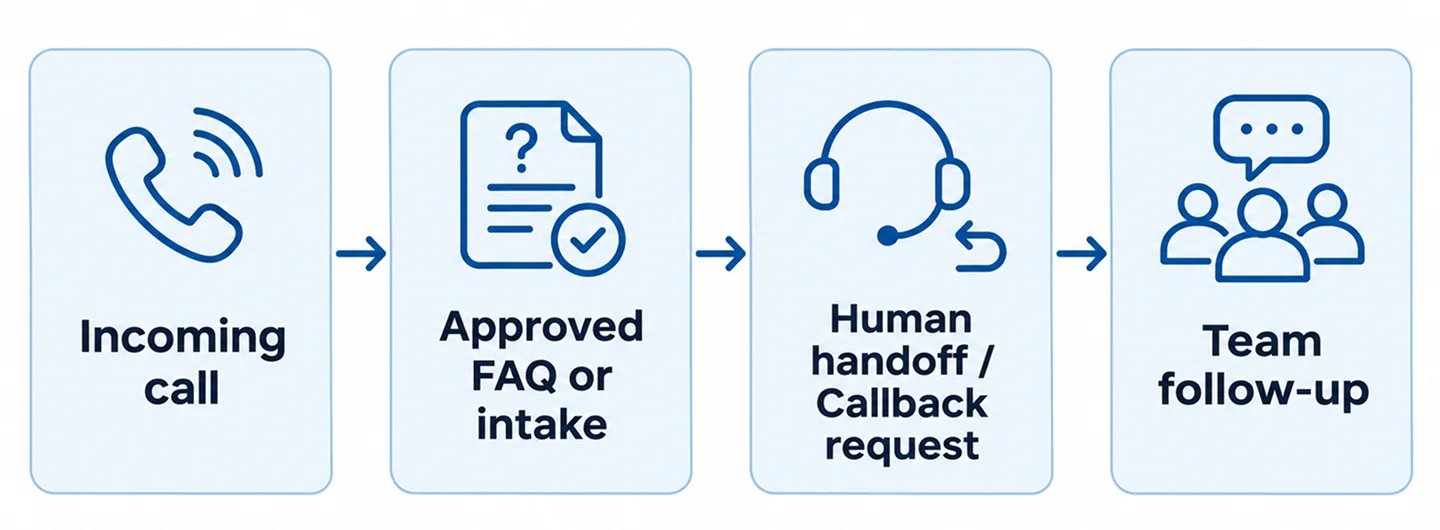
    Workflow showing AI call intake and transfer to a human team

    7. Privacy, Disclosure, and Call Recording

    Voice interactions can involve personal information, including names, phone numbers, addresses, and descriptions of customer needs. Before deployment, decide what data is collected, where it is stored, who can access it, and how long it is retained.

    Call recording, consent, automated communication, and AI disclosure requirements vary by jurisdiction and use case. Businesses should obtain appropriate legal guidance and configure their system to meet applicable rules.

    Never assume that a tool’s default settings automatically satisfy every state or industry requirement. Provide clear caller information and avoid collecting more data than the workflow requires.

    8. How to Measure Whether It Helps

    Track outcomes that matter to the business: valid inquiries captured, calls successfully transferred, callback requests completed, incorrect answers, abandoned calls, and customer complaints.

    Compare these with actual staff follow-up records. A high number of AI-handled calls does not prove that the system created more customers.

    Review a sample of interactions where permitted, document recurring errors, and update approved answers or escalation rules. Human quality checks remain important after launch.

    9. How to Run a Small Pilot

    Begin with a narrow use case, such as after-hours intake for routine service inquiries. Write an approved knowledge base covering service areas, hours, supported services, and callback expectations.

    Create a test plan for common calls, unclear requests, requests for a human, and situations outside the system’s scope. Verify call routing, data delivery, consent behavior, and error handling.

    Launch to a limited call flow when appropriate, review results, and expand only after the system behaves reliably. Keep a manual fallback available.

    Team reviewing an AI receptionist pilot workflow

    Questions to Ask an AI Receptionist Provider

    Ask which phone systems and business tools can be integrated, what happens during an outage, how human transfer works, and whether the system can avoid making unsupported commitments.

    Request details about data retention, security controls, call recordings, consent options, testing, and ongoing maintenance. Clarify how the provider handles changes to business hours, services, and escalation rules.

    Most importantly, ask for a pilot with your own realistic call scenarios rather than relying only on a polished sales demonstration.

    Frequently Asked Questions

    Can an AI receptionist replace a human receptionist?

    It may handle selected routine tasks, but it cannot be assumed to manage every conversation safely or accurately. Human oversight and escalation remain important.

    Can it book appointments automatically?

    Some systems can connect to scheduling tools, but availability and booking confirmation depend on the actual integration. Every workflow should be tested before promises are made to callers.

    Will an AI receptionist answer every call correctly?

    No. Speech recognition and AI responses can fail or misunderstand requests. Monitoring, approved knowledge, and fallback options are essential.

    Is an AI receptionist suitable for a small local business?

    It may be useful when the business receives repeatable inquiries and can follow up on captured requests. Suitability depends on call volume, customer expectations, privacy requirements, and operational readiness.

    Start With the Customer Experience

    An AI receptionist is most useful when it solves a specific problem: collecting routine inquiries, supporting after-hours intake, or routing callers more consistently. The technology should fit the business’s actual workflow and clearly acknowledge its limitations.

    Nabali Development helps businesses explore AI automation opportunities and evaluate practical integrations. If you are considering AI-assisted call handling, start with a review of your current intake process and the situations that require a human response.

    Contact Us
  • How Can Your Business Appear in AI Search Results?

    How Can Your Business Appear in AI Search Results?

    Customers now discover companies through traditional search results, maps, and AI-powered experiences that summarize information or answer questions directly. That creates a new question for business owners: how can a company become easier for AI search systems to discover and describe accurately?

    There is no reliable switch that guarantees your business will be mentioned in an AI answer. Different systems use different sources and may change how they select, summarize, or cite information. However, the same fundamentals that help people understand a company—clear service pages, consistent business details, credible evidence, and an accessible website—can improve its discoverability.

    This guide explains what businesses can control, what they cannot, and how to build a practical AI visibility plan without chasing shortcuts.

    1. Understand What AI Search Visibility Means

    AI search visibility is not a single ranking position. It can refer to a business being mentioned in an AI-generated response, its website being cited as a source, or its information being represented accurately when a user asks about a service or company.

    An AI answer may vary by the question, location, timing, source availability, and product. A business may appear for one question and not another. That is why a screenshot of one answer should never be presented as proof of permanent placement.

    Treat AI visibility as an additional way to assess how understandable and trustworthy your online information is, not as a replacement for conventional search performance.

    2. Build Pages That Clearly Explain Your Services

    Start with the questions your customers actually ask. What do you do? Who do you help? Where do you operate? What is included in a service? How does someone request an estimate or consultation?

    Give important services their own useful pages when the topics warrant it. Use specific headings, straightforward descriptions, and clear next steps. Avoid pages filled with repetitive keywords or generic statements that could describe any company.

    For example, an HVAC company might explain the difference between maintenance and repair, describe the types of systems it services, and clarify its actual coverage area. Useful details serve customers first and may also make the information easier for search and AI systems to interpret.

    Service website page with clear headings and customer information

    3. Make Important Information Accessible to Search Systems

    If key content exists only inside an image, hidden widget, or script that fails to render, visitors and automated systems may have difficulty accessing it. Important business information should appear as readable text in a well-structured page.

    Use logical headings, descriptive links, accessible navigation, and sensible internal linking. Check whether relevant pages can be crawled and indexed by search engines where intended. Ensure that canonical URLs and robots directives do not accidentally exclude important content.

    Technical SEO does not guarantee an AI mention, but it reduces avoidable obstacles. Before adding new AI-specific features, confirm that the existing website works correctly on mobile and that its main service pages are accessible.

    4. Keep Business Information Consistent Across Sources

    For local businesses, accurate names, phone numbers, websites, hours, and service areas matter. Conflicting information can confuse customers regardless of which search experience they use.

    Review your website, Google Business Profile where eligible, and other relevant profiles or directories. Correct outdated phone numbers, old domains, or services that are no longer offered. Do not create fictitious locations to appear in more cities.

    Consistency does not mean copying identical promotional text everywhere. It means ensuring that the underlying facts about the business are correct and easy to verify.

    5. Demonstrate Real Experience and Evidence

    A credible website should show what the business actually does. Authentic project photos, detailed case studies, accurate team information, service explanations, and verifiable customer feedback can help people evaluate a company.

    If you publish a case study, explain the problem, the work performed, and the outcome using information you can substantiate. Do not invent conversion increases, rankings, or customer quotations to make a page more persuasive.

    Where useful, include dates or context so readers can tell whether information is current. A clear explanation of a real project is more valuable than a vague claim that the business is the best in its market.

    Real client project presented in a business case study

    6. Answer Questions Naturally, Not for a Formula

    Helpful articles and FAQs can address questions that do not fit on a short service page. Focus on questions that customers genuinely ask before contacting a provider.

    Use plain language, clear definitions, examples, and relevant limitations. Do not manufacture dozens of nearly identical articles to target slight variations of a phrase. Search engines and AI systems do not offer a universal word count or keyword density that guarantees inclusion.

    Keep information current. When a platform, policy, or service changes, update the article rather than leaving an outdated answer online.

    7. Use Structured Data Carefully

    Structured data can help describe certain page types and business facts in a machine-readable format. Relevant schema may include Organization, LocalBusiness when accurate, Service, Article, and BreadcrumbList, depending on the page.

    Markup must match the visible content. It should not claim ratings, locations, offers, or credentials that do not exist. Valid structured data is not a promise that an AI product will mention the company or that a search result will display a special feature.

    Start by making the page itself accurate and useful. Add appropriate markup as a supporting technical layer, then validate it.

    8. Measure AI Visibility Without Inventing Precision

    Begin with a small set of real customer questions. Record the question wording, product used, date, location context when relevant, whether the business appears, and whether the response cites a source. Repeat checks periodically using a consistent method.

    Do not treat a handful of manually tested prompts as a comprehensive market share measurement. Responses can vary between sessions, and some tools do not expose enough data to attribute every mention or visit.

    Combine this qualitative review with ordinary business measures: search traffic, qualified calls, form submissions, and customer inquiries. The goal is to understand whether customers can find and trust the business—not to chase an isolated screenshot.

    9. Avoid Common AI Visibility Shortcuts

    Be skeptical of guaranteed inclusion in ChatGPT or other AI answers. No agency can control every model’s response or guarantee that a particular business will be cited.

    Avoid publishing misleading claims, fake reviews, synthetic client results, or mass-produced pages that add no original value. Do not block important pages from indexing by accident, and do not assume that installing a chatbot on your website will automatically make the business more visible in AI search.

    A practical strategy combines good content, technical accessibility, accurate business information, and regular review of how customers discover the company.

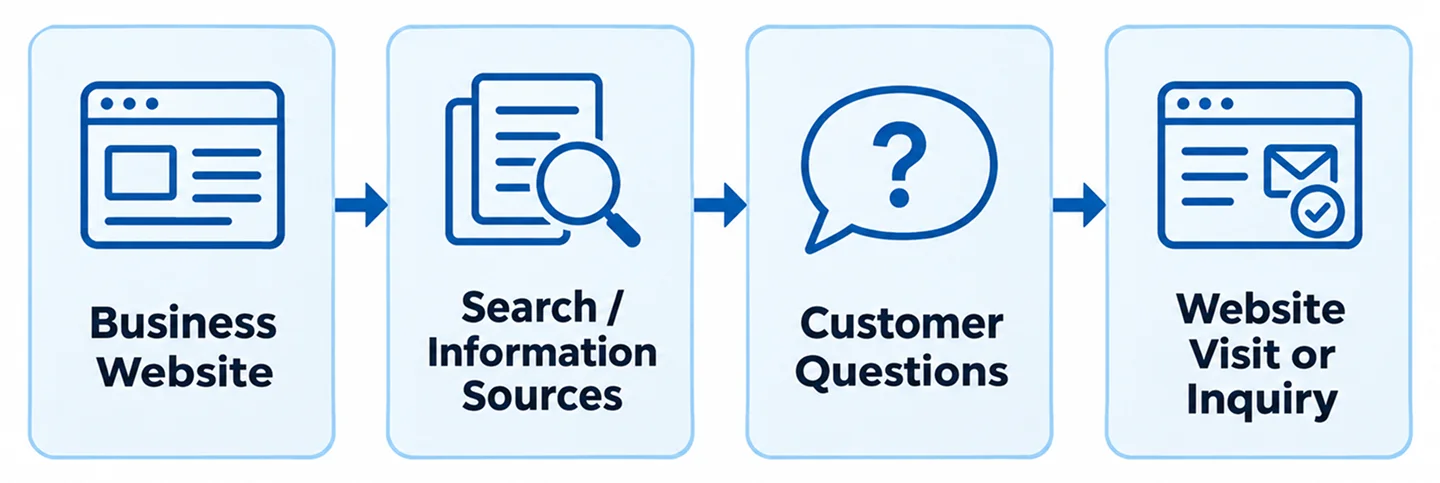
    Illustrative workflow connecting business information with customer discovery

    A Practical 30-Day Starting Plan

    Week 1: Review the homepage, main service pages, and business contact details. Identify inaccurate or missing information and check that important pages are accessible.

    Week 2: Improve the highest-priority service pages with clear descriptions, customer questions, relevant examples, and accurate service areas. Fix broken forms and internal links.

    Week 3: Add or improve one authentic case study or helpful article. Review relevant business profiles for consistency and check appropriate structured data.

    Week 4: Test a small set of realistic customer questions across the AI search products your audience may use. Record observations and prioritize the next improvements. Do not assume that changes will produce immediate mentions.

    Frequently Asked Questions

    Can I pay to guarantee my business appears in AI answers?

    No reputable provider can guarantee organic inclusion or citation across AI systems. Paid advertising products, where offered, are separate from organic mentions and should not be confused with them.

    Does traditional SEO still matter for AI search?

    Yes. Clear content, accessible pages, accurate information, and useful site structure remain important foundations. AI systems vary, so traditional SEO alone does not guarantee a mention.

    Will adding AI-generated articles improve visibility?

    Simply producing more articles is not a reliable strategy. Content should be accurate, useful, distinctive, and reviewed for quality regardless of how it was drafted.

    How do I know whether AI search brings customers?

    Track actual website visits and inquiries where reliable attribution is available, and supplement those data with careful manual checks. Avoid attributing every new customer to AI without evidence.

    Make Your Business Easier to Understand and Discover

    AI-powered discovery is changing, but the strongest starting point is familiar: explain your services clearly, publish truthful evidence, maintain accurate business information, and make it easy for customers to contact you.

    Nabali Development helps US businesses improve websites, SEO foundations, local visibility, and practical AI discovery readiness. If you want to understand where your online presence can improve, request a preliminary review and discuss the next steps.

    Get a Free Website Audit
  • How to Track Calls and Form Leads From Your Website

    How to Track Calls and Form Leads From Your Website

    A website can generate valuable customer inquiries without making them easy to measure. A person may call after reading a service page, submit an estimate form, or return later to contact the business. If those actions are not tracked and verified, marketing reports may tell an incomplete story.

    For local service businesses, tracking matters because a click is not the same as a conversation, and a conversation is not necessarily a qualified lead. A reliable measurement process helps you understand which channels bring relevant inquiries while also revealing operational problems such as missed calls or undelivered emails.

    This guide explains a practical approach to tracking website calls and forms without treating every interaction as a sale or relying on unverified dashboard numbers.

    1. Define What Counts as a Lead

    Start with the business outcome you want to measure. A successful form submission is a useful conversion, but a visitor who merely clicks into a form has not submitted an inquiry. Similarly, tapping a phone number shows intent but does not prove that a call connected.

    Define separate events for actions such as form submission, phone-link click, eligible completed call, booked appointment, and completed job. Do not merge them into one total without explaining the differences.

    For a moving company, an inquiry about a move in the service area may be qualified. A job application or a request for truck rental may not be. Write down the criteria before evaluating performance.

    2. Map Every Contact Path on the Website

    List every place visitors can contact the business: header phone numbers, mobile sticky call buttons, homepage forms, service-page forms, quote requests, contact pages, and campaign landing pages. Include third-party booking or chat tools if they are part of the actual journey.

    For each path, record the destination, responsible team, success state, and intended analytics event. This inventory helps prevent a common problem: tracking the main contact form while ignoring forms on service pages.

    Use a consistent naming convention for events and lead sources. Keep the naming simple enough that a developer and marketing manager can both understand it.

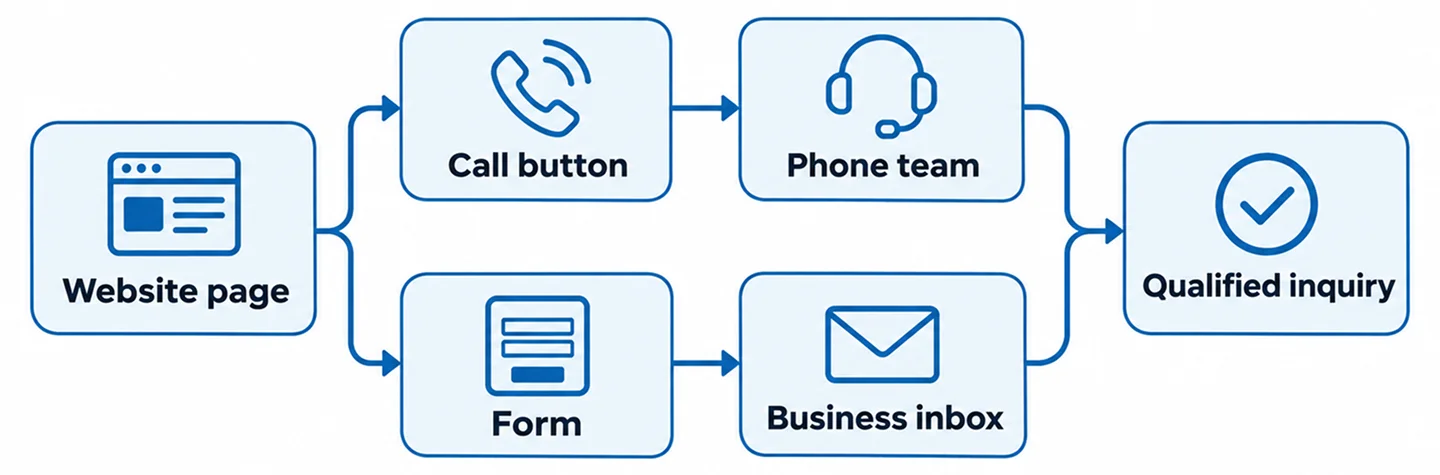
    Website contact paths from page visit to customer inquiry

    3. Track Form Submissions Only After Success

    A form event should fire after the server or approved form service confirms that the submission succeeded. A click on the Submit button is not enough: the visitor may have left required fields empty, encountered a network error, or triggered spam protection.

    For WordPress websites using Contact Form 7 or another form tool, identify the actual success signal supported by that implementation. Confirm that the event fires once and carries only appropriate non-sensitive metadata, such as form type or page category.

    Do not send names, email addresses, phone numbers, message bodies, or other personal information to analytics as event parameters. Confirm privacy and consent requirements for your business and visitors.

    4. Verify That the Business Actually Receives the Inquiry

    Analytics can report a successful form event even when an email notification fails. Test the entire chain: submit a clearly labeled test inquiry, verify the website success state, check the mailbox or CRM destination, and confirm that staff can access the lead.

    If the website uses email notifications, review authentication and deliverability settings with the hosting or email administrator. If submissions are stored in a database or CRM, verify that the record is created once and assigned correctly.

    Keep a short test log with the date, page URL, form name, unique test identifier, delivery result, and analytics result. This is much more useful than a screenshot of a thank-you message alone.

    5. Understand the Difference Between Phone Clicks and Calls

    A tel: link can be tracked as a phone-click event, but it cannot by itself prove that a call connected, was answered, or involved a potential customer. Visitors can tap and cancel, or copy the number to call later.

    For stronger call attribution, businesses may use a suitable call-tracking provider or platform-supported call reporting. Capabilities vary by country, account, call route, and provider. Review privacy, recording consent, number ownership, and forwarding behavior before implementation.

    When possible, compare attributed calls with the business phone system and intake records. A missed call is a real operational signal even if it does not become a booked job.

    Mobile service website with a click-to-call button

    6. Configure GA4 Events With Clear Meanings

    Google Analytics 4 can record events that describe user interactions. Choose meaningful names and document when each event fires. For example, a lead-generation event should represent a successful inquiry, not simply opening the contact page.

    If Google Tag Manager is used, verify that the same event is not also sent by a WordPress plugin or a second integration. Duplicate installations can inflate counts and make reporting unreliable.

    Use a clean browser session to test the flow, taking consent settings into account. Confirm what is received in the relevant debugging or reporting interface rather than assuming that the presence of a script means tracking works.

    Google Ads optimization depends on meaningful conversion data. Decide which actions should be used for campaign evaluation and bidding, and distinguish primary lead conversions from secondary diagnostic interactions.

    If importing GA4 conversions into Google Ads, check whether a direct Google Ads tag already measures the same action. Avoid counting one submission twice through parallel configurations.

    Campaign attribution also depends on preserving relevant click and campaign information across landing pages, forms, redirects, and approved lead systems. Test the actual route rather than assuming UTM parameters always survive.

    8. Prevent Duplicate Leads and False Successes

    Common duplicate scenarios include refreshing a thank-you page, firing a submit-click event alongside a successful-submit event, sending the same conversion through two tags, or allowing a form to submit twice after repeated clicks.

    A robust setup uses a success signal and, where technically appropriate, a unique non-personal submission identifier to support deduplication. Do not invent identifiers in reports or expose customer details.

    Test failure cases as well: invalid fields, disconnected networks, blocked spam submissions, and a server error must not register as completed leads.

    9. Connect Marketing Reports to Lead Quality

    A campaign with more form submissions is not automatically the best campaign. Ask whether inquiries match the service area, requested services, and business capacity. Review booked consultations or jobs when trustworthy operational records are available.

    Create a simple shared vocabulary: inquiry received, qualified, contacted, appointment booked, job won, and not relevant. A CRM or spreadsheet can help track the progression, provided personal data is handled appropriately.

    Compare equivalent time periods and note major changes such as seasonal demand, business hours, or staffing. Avoid claiming that a marketing change caused a result without sufficient evidence.

    Business owner and marketing specialist reviewing lead quality

    10. A Practical Lead-Tracking Test Checklist

    First, inventory every form and call button. Next, submit one marked test lead per distinct form flow and verify delivery to the correct recipient. Check phone links on mobile and, where authorized, confirm that call reporting matches the actual call route.

    Then test the analytics event in a clean session, confirm that it fires once, and check that failed submissions do not count. Repeat the process for important advertising landing pages and after major website updates.

    Document what was tested, what could not be verified, and who owns the remaining action. Reliable tracking is an ongoing process, not a one-time checkbox.

    Frequently Asked Questions

    Can GA4 tell me whether a phone call was answered?

    Not from a basic phone-link click alone. Answered-call details require appropriate call-reporting or phone-system data and an integration that supports the needed measurement.

    Should I track every button click as a lead?

    No. Button clicks can be useful engagement signals, but a lead event should reflect a confirmed inquiry or another clearly defined business action.

    Why do form leads appear in analytics but not in my email?

    The analytics event and email delivery may be separate systems. Test server-side submission, notification configuration, spam filtering, and the receiving mailbox or CRM.

    Can Google Ads and GA4 both track the same form?

    They can, but conversion setup needs careful coordination so the same action is not unintentionally counted twice for optimization and reporting.

    Make Every Inquiry Measurable and Actionable

    Good tracking helps a business answer three questions: Did the customer reach us? Where did the inquiry come from? Was it relevant to the services we offer? Start by making forms and calls reliable, then build measurement around verified outcomes.

    Nabali Development helps US service businesses improve websites, lead-generation workflows, and digital marketing measurement. If you are unsure whether your website is capturing and tracking inquiries correctly, request a preliminary website review.

    Get a Free Website Audit
  • Why Your Google Ads Get Clicks but No Leads

    Why Your Google Ads Get Clicks but No Leads

    Clicks without customer inquiries are frustrating, especially when a local service business depends on calls and estimate requests. But a click is not a lead. It only means someone interacted with your ad; what happens before and after that interaction determines whether the campaign creates a real opportunity.

    The cause may be an irrelevant search query, the wrong geographic setting, a confusing landing page, a broken form, or missed phone calls. Sometimes leads are arriving but the tracking is incomplete. Before making major changes to bids or budgets, follow the customer journey from search to contact.

    Use the checks below to identify where the process breaks down. Each one includes a practical action you can take without assuming that more ad spend is the solution.

    1. Your Ads Are Matching the Wrong Searches

    A campaign can attract clicks from people who are researching, looking for jobs, comparing do-it-yourself instructions, or seeking a service you do not offer. Those visitors may be genuine searchers but poor prospects for your business.

    Review the search terms report where available. Look for patterns such as employment queries, equipment rentals, free resources, or unrelated services. Add appropriate negative keywords and refine keyword targeting. Do not block broad categories indiscriminately: a term that looks irrelevant in one business may be valuable in another.

    Compare the wording of each ad with the services on its landing page. The closer the match to a genuine customer need, the easier it is for visitors to understand the offer.

    2. Your Location Targeting Is Too Broad

    A local contractor may receive clicks from people outside the area where the team can actually work. Check campaign location settings, the geographic areas included, and location reports when available.

    For many local service businesses, targeting people physically in or regularly in the service area may be more appropriate than including people who only show interest in that location. Choose the setting that fits the business and review it after launch.

    Also check the website. If the landing page never mentions the real service area, customers may not know whether they qualify.

    3. The Landing Page Does Not Match the Ad

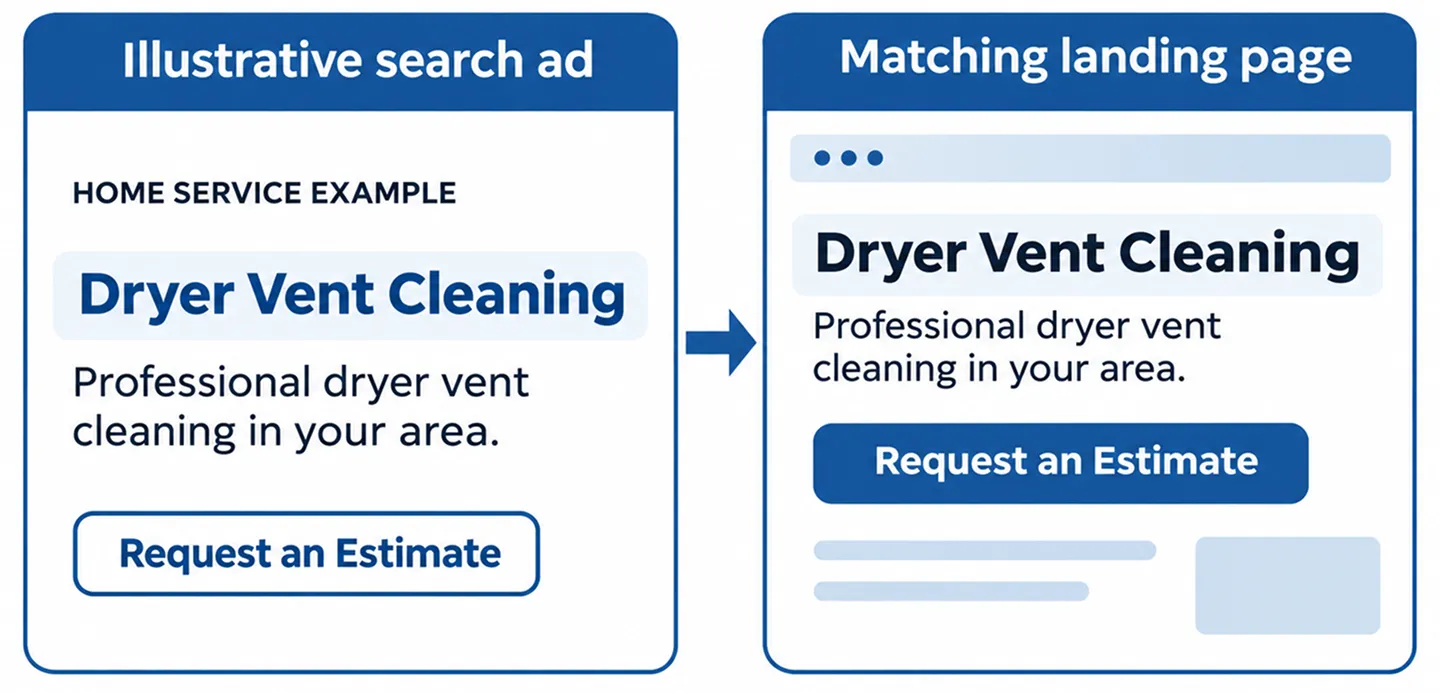
    Imagine an ad promising dryer vent cleaning that sends visitors to a generic homepage listing six unrelated services. The customer must search again for the information they expected to see.

    A focused landing page should confirm the advertised service, explain who it is for, show relevant trust information, and provide a clear next step. The page does not need to be long, but it should answer the visitor’s most immediate questions.

    Review the ad and destination together. Use consistent service names, accurate locations, and a call to action that matches the customer’s intent.

    Illustration of matching an advertisement to its landing page

    4. Visitors Cannot Easily Call or Request an Estimate

    On a phone, the primary action should be obvious. A tiny contact link in the footer, a form with too many required fields, or a button that does nothing can cause visitors to leave.

    Test the page on a real mobile device. Tap the call button, open the form, submit a marked test inquiry, and verify the result. Confirm that the correct team receives the message and that the visitor sees a useful success state.

    Ask only for information needed to begin the conversation. Additional project details can often be collected after the first contact.

    5. Your Forms Work Visually but Fail Behind the Scenes

    A form may show a success message while notifications go to spam, fail authentication checks, or never reach the intended inbox. Third-party integrations can also fail silently.

    Run an end-to-end test: submit a unique test inquiry, verify the submission record if available, check the receiving mailbox or CRM, and confirm any notification workflow. Test error states too, including missing required fields.

    Do not treat a thank-you page as proof of email delivery. Both the customer-facing experience and the actual lead destination need verification.

    6. Your Team Misses Calls or Responds Too Slowly

    A campaign can produce genuine phone inquiries while the business records few booked jobs. Missed calls, unanswered messages, and delayed follow-up can make advertising appear less effective than it is.

    Review call records where permitted and compare them with business intake logs. Determine whether calls reached staff, whether they were answered, and whether the request was within your service scope.

    Set a clear follow-up process for missed calls and forms. An automated acknowledgment may help, but it should not pretend that a person has already reviewed the request.

    Mobile landing page with a visible call or estimate action

    7. Conversion Tracking Is Misconfigured

    An account may show zero conversions even when inquiries arrive. It can also overstate results by counting page views, repeated thank-you visits, or button clicks as completed leads.

    Define exactly what a qualified conversion means for the business: a successfully submitted form, an eligible phone call, a booked appointment, or another verified action. Then test that event in the actual customer journey.

    Check whether Google Ads, Google Analytics, and tag management are sending duplicate events. Review consent behavior and cross-domain or redirect flows where relevant. A reliable measurement setup is essential before judging performance.

    8. You Are Optimizing for Clicks Instead of Useful Outcomes

    A campaign strategy focused on traffic can bring visitors without necessarily prioritizing lead quality. The right bidding approach depends on the account’s conversion setup, available data, and business goals.

    Before changing strategies, confirm that conversion actions are meaningful and recorded consistently. Review which campaigns and search terms produce genuine inquiries rather than only low-cost clicks.

    Do not assume that a lower cost per click is a win. A more expensive click that results in a relevant customer conversation may be more useful than several cheap but unrelated visits.

    9. Your Offer or Trust Signals Are Unclear

    People may click because the ad is relevant but hesitate when the page provides little information about the company. A vague service description, outdated photos, inconsistent phone number, or unsupported claims can reduce confidence.

    Explain the service in plain language. Show authentic project photos and accurate service-area information. If you publish reviews or testimonials, use genuine customer-approved material and avoid invented ratings.

    Tell visitors what happens after they request an estimate. Clear expectations often matter more than decorative design.

    10. You Are Evaluating the Wrong Time Period

    Small samples can be misleading. A few days of clicks may not reveal much about lead quality, especially in seasonal or low-volume service categories.

    Review comparable periods and consider changes in demand, business hours, weather, staffing, and campaign settings. Look at the entire path from click to inquiry to completed work when those records are available.

    Make changes in a controlled way and document what changed. If keywords, landing pages, bidding, and tracking all change at once, it becomes harder to understand which adjustment mattered.

    Steps from a Google Ads click to a qualified customer inquiry

    A Practical Troubleshooting Order

    Start with what can be verified quickly: confirm the website loads, test the phone number and form, and check that the inquiry reaches the intended person. Next, inspect search terms, service relevance, and location targeting.

    Then validate conversion events and compare advertising records with actual calls and inquiries. Only after these basics are reliable should you decide whether to adjust bids, creative, or budgets.

    Keep a short change log with the date, campaign, issue, action, and observed result. This prevents repeated guesses and makes future optimization more disciplined.

    Frequently Asked Questions

    Why am I paying for Google Ads clicks without getting calls?

    Possible causes include irrelevant queries, broad location targeting, unclear landing pages, broken call links, missed calls, or tracking gaps. Check the full inquiry process before assuming the ads themselves are the only problem.

    Can Google Ads show zero conversions even when leads arrive?

    Yes. Missing tags, incorrect event definitions, consent behavior, and broken redirects can prevent conversions from being recorded. Verify actual submissions and calls against the tracking setup.

    Should I increase my budget to get more leads?

    Not until you know whether the current clicks are relevant and the lead process works. Increasing spend can amplify an existing problem.

    How long should I wait before changing a campaign?

    There is no universal waiting period. Use the volume and quality of available data, the severity of any issue, and the business’s operating needs. Fix broken forms or obviously irrelevant targeting immediately.

    Turn More of the Right Clicks Into Real Conversations

    Successful lead generation requires more than an ad that earns clicks. The search intent, geographic reach, landing page, contact experience, follow-up process, and measurement all need to work together.

    Nabali Development helps US service businesses review Google Ads campaigns and the websites behind them. If your campaigns are generating clicks but few useful inquiries, request a preliminary review to identify the most important next step.

    Get a Free Website Audit
  • Google Ads for Local Service Businesses: Getting Started

    Google Ads for Local Service Businesses: Getting Started

    Google Ads can help a local service company reach people who are actively searching for a service. But launching a campaign is not the same as generating profitable jobs. The result depends on the services you advertise, where your customers are located, the quality of your landing pages, and how quickly your team responds to inquiries.

    This guide walks through the foundations of a practical Search campaign for US service businesses such as cleaning companies, HVAC contractors, remodelers, and movers. It focuses on decisions you can verify rather than shortcuts or promises of instant leads.

    1. Define What Counts as a Valuable Lead

    Before building a campaign, decide what you want a customer to do. For many service companies, that means a qualified phone call or a completed estimate request—not simply a website visit.

    Write down which services you want to promote, which areas you actually serve, and whether your team can respond to calls and form submissions during the hours ads may run. An inquiry outside your coverage area or for a service you do not offer is not a useful result.

    Choose a primary conversion that reflects a meaningful customer action. Treat secondary actions, such as clicking a phone button, as diagnostic signals unless you can verify they represent real inquiries.

    2. Start With a Focused Campaign Structure

    Organize campaigns around real business priorities rather than putting every service into one broad collection of keywords. A company offering duct cleaning and dryer vent cleaning may benefit from distinct groups because the searches and landing pages are different.

    Begin with a manageable set of services and locations. Clear separation makes it easier to understand which inquiries come from which service and where irrelevant traffic originates.

    Do not create dozens of nearly identical campaigns simply to fill an account. A small, well-monitored structure is easier to improve than a sprawling setup with little conversion data.

    3. Choose Geographic Targeting Carefully

    Local service businesses should align advertising coverage with where they can realistically complete work. Check the campaign’s location options and choose the setting that best fits the intended audience; options and labels can change over time.

    Review whether the campaign is reaching people physically in your service area versus people merely showing interest in that location. For a local contractor, those audiences may not be equally useful.

    Avoid targeting an entire state when your team serves only a handful of towns. Confirm service-area information on the landing page so visitors know whether they are eligible to request a quote.

    Illustration of geographic targeting for a local service business

    4. Select Keywords Based on Customer Intent

    Look for phrases that describe a service a customer is ready to request, such as ‘dryer vent cleaning near me’ or ‘window cleaning estimate’. Keep the language aligned with the actual service and the landing page.

    Keyword match types influence how ads can match searches. Start with a deliberate strategy and inspect the search terms report where available. Match behavior and reporting features can evolve, so verify current Google Ads documentation before making assumptions.

    Build a negative keyword process to exclude clearly irrelevant themes such as jobs, training, do-it-yourself instructions, or equipment rental when those do not match the business. Do not add exclusions so broadly that they block legitimate customers.

    5. Write Ads That Match the Service and Destination

    Strong ad copy identifies the service, relevant coverage, and a realistic next step. Use factual claims the business can support. Avoid promises such as guaranteed same-day availability unless the company can consistently deliver them.

    Send visitors to a page focused on the service they searched for. A generic homepage may require extra navigation, while a useful service landing page can explain the work, coverage, trust factors, and how to request an estimate.

    Make sure the business name, phone number, and offer are consistent across the ad and destination. Do not use fake reviews, unverified awards, or unsupported performance claims.

    6. Make Phone Calls and Forms Work Before Spending

    A call-focused business should test mobile tap-to-call buttons, business hours, voicemail, and call handling. Missing a call is an operational problem that campaign optimization alone cannot solve.

    Test forms end to end: submit a marked test inquiry, confirm the recipient receives it, check any CRM entry, and verify the success page or confirmation message. A form that displays a success notice but never delivers the inquiry is not ready for paid traffic.

    If you use call tracking, understand what is measured. A click on a phone number is not necessarily a completed conversation. Define which events are primary conversions and avoid counting one inquiry multiple times.

    Local service landing page with clear estimate request action

    7. Configure Measurement With Care

    Google Ads and analytics tools can help show which campaigns lead to calls and form inquiries, but tracking must be tested. Check that tags fire only for the intended actions and that thank-you pages do not create duplicate conversions when refreshed.

    Preserve relevant campaign parameters when visitors move between pages or submit forms. Where appropriate, connect advertising data with the business’s own lead records so you can evaluate inquiry quality, not just event counts.

    Respect applicable privacy and consent requirements. Avoid collecting sensitive personal information in tracking parameters or sending private form contents into analytics systems.

    8. Review Search Terms and Lead Quality Regularly

    After launch, review search terms, service relevance, locations, device patterns, and the quality of actual inquiries. Look for patterns before making large changes based on a single day.

    Check whether ads are attracting people seeking a different service, looking for employment, or living outside the business’s coverage area. Adjust keywords, negatives, landing pages, and location settings when the evidence supports it.

    Ask the team handling calls which inquiries were useful. Advertising reports alone cannot always tell whether a call became a qualified opportunity or a booked job.

    9. Know When to Expand—and When to Fix the Basics

    Expansion makes sense when the campaign’s tracking is reliable, the team can handle additional inquiries, and you understand which services generate useful leads. Add new services or locations in a controlled way so results remain interpretable.

    If clicks arrive but calls and forms do not, first check the destination page, business hours, phone routing, form delivery, and search relevance. Increasing spend before fixing those issues may simply produce more unproductive visits.

    No responsible agency can guarantee a fixed number of calls, bookings, or a particular return. Performance varies with demand, competition, campaign settings, and the business’s own response process.

    A Pre-Launch Google Ads Checklist

    Confirm the campaign promotes services the company actually provides. Verify geographic coverage, keyword relevance, negative keyword logic, ad copy, and the destination page.

    Test phone links, form submissions, conversion events, and the receiving mailbox or CRM. Confirm the team knows how to identify and follow up on leads. Review account access and ensure the business retains appropriate ownership.

    Once the campaign is live, monitor results consistently and record meaningful changes so you can understand what helped or hurt performance.

    Local business owner reviewing advertising performance with a specialist

    Frequently Asked Questions

    Are Google Ads useful for small local businesses?

    They can be, especially when customers search for specific services and the business can respond to inquiries. Results depend on demand, competition, targeting, landing pages, and follow-up.

    Should I advertise every service at once?

    Not necessarily. Starting with a focused set of priority services can make performance easier to evaluate and help you identify what works before expanding.

    Is a click the same as a lead?

    No. A click indicates a visit or interaction, not necessarily a qualified call, form inquiry, appointment, or sale. Define and verify conversion actions carefully.

    Can Google Ads replace SEO?

    The channels serve different roles. Ads can provide paid visibility while campaigns run; SEO helps improve a site’s organic discoverability over time. Both depend on accurate, useful website content.

    Build a Campaign Around Real Customer Inquiries

    The best starting point is a clear service offer, accurate local targeting, a trustworthy landing page, reliable lead delivery, and a process for evaluating real inquiries.

    Nabali Development works with US service businesses on Google Ads, websites, local SEO, and conversion tracking. If you are planning a campaign or reviewing an existing one, request a preliminary assessment of your website and lead flow.

    Get a Free Website Audit
  • SEO vs. Google Ads: What Should a Small Business Invest In?

    SEO vs. Google Ads: What Should a Small Business Invest In?

    For a small business, the question is rarely whether SEO or Google Ads is universally better. The useful question is which channel can help you reach the right customers, at the right time, with a website that turns interest into inquiries.

    Search engine optimization (SEO) helps improve how a website is understood and discovered in unpaid search results. Google Ads lets advertisers pay to show ads in eligible placements, subject to auction conditions, targeting, and campaign settings. Both can support growth, but they operate differently.

    This guide explains the trade-offs without promising rankings, immediate leads, or a specific return on investment.

    SEO and Google Ads: The Core Difference

    SEO focuses on useful content, technical accessibility, site structure, and other signals that can help search engines discover and understand your pages. Improvements may take time to influence visibility, and performance can change as competition and search systems evolve.

    Google Ads can make a business eligible to appear for relevant searches while a campaign is running. That does not mean every search will show an ad or that every click will turn into a customer. Campaign structure, relevance, bidding, landing pages, and follow-up all matter.

    SEO is not free simply because you do not pay for each organic click: content, development, maintenance, and analysis require resources. Google Ads also needs management beyond media spend.

    1. How Quickly Do You Need Qualified Inquiries?

    If a new service business needs to test demand or reach customers searching for a specific service, a carefully scoped Google Ads campaign can provide feedback sooner than waiting for new organic pages to gain visibility.

    If your goal is to build useful service content and strengthen search visibility over time, SEO deserves sustained attention. It usually requires patience, especially for a new domain or competitive market.

    A practical decision may be to use ads for time-sensitive demand while building the website’s organic foundations. Neither channel fixes a poor offer or an unreliable contact process.

    2. What Are Customers Actually Searching For?

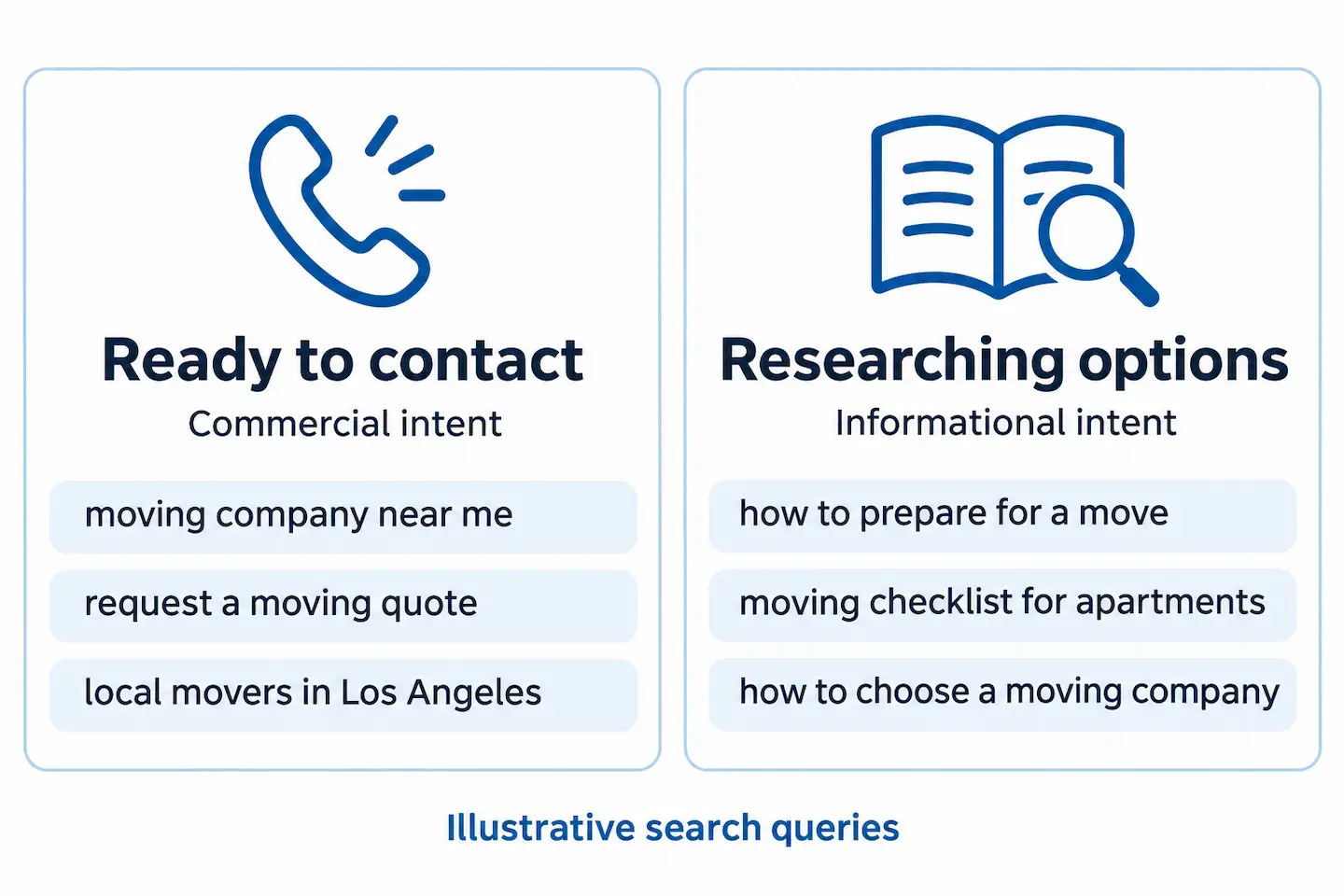
    Consider the language customers use when they need your service. A homeowner searching for emergency plumbing help may be ready to call. Someone searching for the difference between two flooring materials may still be researching.

    Google Ads can focus on selected commercial-intent queries and locations. SEO can address both service searches and useful informational questions through distinct pages and articles.

    Do not target every keyword you can find. Prioritize searches that match services you genuinely provide and locations you actually serve.

    Comparison of commercial and informational search intent

    3. What Happens After the Click?

    Both channels depend on the destination page. Visitors should immediately recognize the service they searched for, see the relevant location or service area, and understand how to contact the business.

    Check that phone buttons work on mobile, forms deliver messages, and the page answers common objections. A dedicated campaign landing page may be appropriate for a focused offer, while organic service pages can provide deeper context and internal navigation.

    If visitors arrive but rarely inquire, investigate page relevance, speed, clarity, trust signals, and form reliability before assuming the traffic channel is the only problem.

    4. How Will You Measure Results?

    Clicks and impressions are useful diagnostic metrics, but business decisions should also consider qualified inquiries, booked appointments, completed jobs, and the value of those outcomes when reliable records exist.

    For Google Ads, review search terms where available, conversion actions, location targeting, and campaign performance. For SEO, use Search Console to understand organic search queries and landing pages, and analytics to evaluate site behavior where configured.

    Call tracking and form tracking need careful setup. Avoid counting a button click as a completed lead unless that is the intended metric, and do not count the same form submission multiple times.

    Compare equivalent time periods and account for seasonality. A month with more calls does not automatically prove that one marketing channel caused the increase.

    5. Local Businesses Need More Than One Search Surface

    Local service companies may be discovered through traditional organic results, Google Maps, Business Profiles, and paid placements. These surfaces have different requirements and reporting methods.

    An accurate Google Business Profile, relevant service pages, genuine service-area information, and a reliable contact process support local discovery. Paid campaigns can complement those foundations, but should not be confused with organic map visibility.

    Do not create fictional offices, keyword-stuffed business names, or duplicate city pages to chase local rankings. Accurate information and useful content are the safer long-term approach.

    Local service business page with a clear inquiry action

    6. When SEO May Be the Better First Priority

    Prioritize SEO foundations when your website has missing or thin service pages, confusing navigation, duplicate content, technical indexing problems, or weak information about the areas you serve.

    SEO is also a sensible long-term investment when customers research services before contacting a provider and your business can publish genuinely helpful information.

    Start with a site review, fix technical blockers, improve the most important service pages, and build internal links that help visitors move between related topics.

    7. When Google Ads May Be the Better First Priority

    Google Ads may deserve early attention when you have a clear service offer, defined geographic coverage, a working landing page, and the capacity to respond promptly to inquiries.

    It can also help test which messages and service categories attract interest. However, campaigns should be monitored for irrelevant searches, wasted spend, tracking problems, and lead quality.

    Before increasing spend, verify that form submissions and calls reach the business. Advertising cannot compensate for missed calls or broken lead delivery.

    8. Why a Combined Strategy Often Makes Sense

    SEO and Google Ads can support different stages of the same customer journey. Ads may help reach ready-to-act searchers, while useful organic content can answer questions and build understanding over time.

    Insights from paid search can inform service-page language, while strong organic pages can help clarify what a landing page needs to communicate. The two channels should share consistent business information and conversion definitions.

    A combined strategy is not mandatory. A small business may start with one channel and expand after its website, operations, and measurement are reliable.

    A Simple Decision Checklist

    Ask: Do we need inquiries soon, or are we primarily building long-term discoverability? Are our service pages accurate and useful? Can we answer calls and respond to form leads quickly? Do we know which services and locations are most important?

    Then check whether tracking is trustworthy, whether the team can support ongoing content work, and whether the business has a clear process for following up with leads.

    Choose the channel that best fits those realities. Revisit the decision using qualified inquiries and business outcomes rather than impressions alone.

    Business owner discussing SEO and advertising strategy

    Frequently Asked Questions

    Is SEO cheaper than Google Ads?

    Not necessarily. SEO does not charge per organic click, but effective work involves content, technical improvements, and ongoing analysis. Google Ads includes media spend and management. Compare the full scope and business outcomes rather than only the payment model.

    Can Google Ads improve organic rankings?

    Running ads does not directly purchase higher organic rankings. Advertising and organic search use different systems.

    Should a new business start with SEO or Google Ads?

    That depends on urgency, the website’s condition, demand for the service, and the ability to handle leads. A new business often benefits from establishing solid website and local-search foundations regardless of whether it also advertises.

    How do I know whether my marketing is working?

    Track qualified calls and form inquiries, confirm they reach your team, and connect them to actual appointments or jobs when possible. Review trends over comparable periods and investigate changes before drawing conclusions.

    Choose a Strategy That Fits Your Business

    SEO and Google Ads are tools, not substitutes for a clear offer and a functional website. Start with customer intent, realistic operational capacity, and reliable measurement.

    Nabali Development helps US service businesses plan websites, SEO, local visibility, and Google Ads around practical goals. If you are deciding where to focus next, request a preliminary review of your current website and marketing setup.

    Get a Free Website Audit
  • Why Your Business Isn’t Showing Up on Google Maps

    Why Your Business Isn’t Showing Up on Google Maps

    A customer searches for a service you offer, adds the name of your city, and sees other companies on Google Maps—but not yours. That can be frustrating, especially if your business has a website and an established customer base.

    There is no single reason a business may be missing from Maps results. Your profile might not be eligible or verified, your information might be incomplete, or your business might simply not appear for that particular search and location. These situations require different solutions.

    Use the steps below to distinguish a missing listing from a visibility problem and decide what to investigate first.

    1. First, Check Whether Your Business Is Actually Missing

    Search Google Maps for your exact business name and city, then search for your business name together with its street address or phone number. Try from a signed-out browser session and note your location. A profile that appears for a branded search but not for “service near me” is not necessarily missing; it may have limited visibility for that query.

    Search results vary by location, wording, and other factors. Do not judge your visibility using only one device or one search. Record the searches you tried so you can compare them later.

    2. Confirm Your Business Is Eligible for a Profile

    Google Business Profile is intended for eligible businesses that have in-person contact with customers during their stated hours. Certain online-only businesses and locations that do not meet Google’s requirements are not eligible.

    A service-area business, such as a cleaning or moving company, may qualify even if it visits customers rather than receiving them at a storefront. Its profile settings should accurately reflect how the business operates. Do not use a virtual office, rented mailbox, or borrowed address to create a misleading location.

    3. Review Verification and Profile Status

    A profile may need verification before the owner can manage it fully or before information appears as expected. Sign in to the Google account that manages the business and review any verification prompts, restrictions, or status notices.

    If Google requests additional information, follow the instructions in the official Business Profile interface. Do not repeatedly create new profiles as a workaround. If a profile is suspended or disabled, investigate the stated reason and use the appropriate review or appeal process.

    Business owner checking Google Business Profile status

    4. Make Sure You Are Not Managing a Duplicate

    Duplicate or outdated listings can confuse both owners and customers. Search for alternate versions of your company name, old addresses, and previous phone numbers. Check whether a former employee or agency created a listing years ago.

    If you find a duplicate, determine which profile represents the legitimate business and use Google’s supported ownership or duplicate-resolution process. Do not delete or merge profiles casually; a mistake can affect customer-facing information and reviews.

    5. Check Your Primary Category and Services

    The primary business category should describe your main real-world activity. A company offering dryer vent cleaning should not select an unrelated category solely because it seems more popular in search.

    Add appropriate secondary categories only for services you genuinely provide. Where the profile supports it, list specific services with clear descriptions. Make sure those services are also explained on relevant pages of your website.

    Categories are an important relevance signal, but changing one is not a guaranteed way to appear in the top results.

    6. Check Address, Service Area, Hours, and Contact Details

    Confirm that your business name, phone number, website, and hours are accurate. If you serve customers at their locations, use the address and service-area settings appropriate to your business model. Do not display a private residential address if the profile rules require it to be hidden.

    Your stated service area should describe where you actually work. Listing a long collection of cities does not create a physical location in each city or guarantee that your profile will appear there.

    Check that your website contact page reflects the same real business identity and gives customers a working way to reach you.

    7. Understand Why You May Not Rank for “Near Me”

    Google describes local ranking in terms of relevance, distance, and prominence. A business can be eligible, verified, and accurately configured yet appear below competitors for a particular search.

    Distance matters: someone searching across town may see different businesses from someone standing near your service area. Relevance depends partly on how well your business information matches the query. Prominence can reflect information Google knows about the business from different sources.

    There is no legitimate shortcut that guarantees placement in the Google Maps three-pack. Be cautious of anyone promising a fixed position.

    Example of local service search results on Google Maps

    8. Improve the Website That Supports Your Profile

    A Business Profile is not a substitute for a useful website. Visitors who click through should immediately understand your services, location or service area, and how to contact you.

    Create distinct, helpful pages for major services. Explain genuine service areas with useful local context where appropriate. Keep your site mobile-friendly, ensure contact forms work, and use descriptive page titles and headings.

    Avoid doorway pages that repeat nearly identical copy for dozens of cities. Also check for technical problems such as accidental noindex tags, broken redirects, and pages that cannot be loaded.

    9. Use Real Photos and an Ethical Review Process

    Upload authentic images of your team, work, vehicles, storefront, or equipment when relevant. Photos should represent the actual business rather than stock images passed off as completed jobs.

    Invite customers to share honest reviews without rewards, pressure, or filtering out dissatisfied customers. Do not buy reviews or ask only happy customers to post. Respond professionally and avoid exposing private details.

    These practices help customers evaluate your business. They do not guarantee a specific ranking.

    10. Measure What Happens After People Find You

    Review available Google Business Profile performance data and your website analytics. Look at relevant actions such as website visits and calls, but remember that reporting definitions and availability can change.

    Compare meaningful periods rather than reacting to one day. Confirm that website forms deliver messages and that phone calls are answered. A business may have a visibility problem, a contact-conversion problem, or both.

    Small business owner reviewing local search performance

    A Practical Troubleshooting Checklist

    Start with an exact-name Maps search. Confirm eligibility and the profile’s verification status. Look for duplicates. Review the primary category, services, address or service area, phone, hours, and website link. Test your website and contact forms. Finally, compare local visibility from relevant search locations and review available performance data.

    Document each change and allow time to evaluate it. If the profile is restricted, resolve that status first instead of making repeated speculative edits.

    Frequently Asked Questions

    Why does my business appear by name but not for my service?

    A branded search and a category search are different. Your profile may exist and be visible by name while other businesses are more relevant or closer for a particular service query.

    Can I add more cities to my service area to rank there?

    You can describe genuine service coverage where the interface allows, but adding cities does not guarantee visibility or create additional physical locations.

    Should I create a new profile if mine is suspended?

    Usually the appropriate first step is to review the reason for the restriction and follow Google’s supported appeal or resolution process. Creating duplicates can make matters worse.

    How long does it take to appear on Google Maps?

    There is no universal timeline. Verification, review of edits, eligibility, and search visibility vary. Avoid anyone offering a guaranteed deadline or ranking.

    Get a Clearer Picture of Your Local Visibility

    If your business is difficult to find on Google Maps, begin by identifying the actual problem: missing or restricted profile, inaccurate information, weak relevance, or limited visibility for a particular location.

    Nabali Development helps US local service businesses review their Google Business Profile information, website structure, and local SEO foundations. Request a preliminary review to discuss the next practical step.

    Get a Free Website Audit
  • How to Optimize Your Google Business Profile: A Practical Guide for Local Businesses

    How to Optimize Your Google Business Profile: A Practical Guide for Local Businesses

    When someone searches for a nearby service, a Google Business Profile can help them understand what a company does, where it operates, when it is available, and how to get in touch. For a local service business, those details can be as important as the website itself.

    Optimization is not about filling every field with keywords or publishing constant updates. It starts with accurate information, a profile that reflects the real business, and a customer experience that supports what the listing promises.

    This practical guide walks through the decisions that matter most, common mistakes to avoid, and a manageable routine for keeping your profile useful.

    1. Confirm Ownership and Access Before Editing

    Start by locating the correct business profile and confirming that the business owner has appropriate control. If an agency helps manage the listing, the owner should retain ownership and grant manager access through Google’s supported process.

    Check for duplicate profiles, old addresses, outdated phone numbers, and listings created by previous employees or agencies. Do not create a second profile simply because access to the first is inconvenient.

    Before making major changes, record the current business name, primary category, address or service-area settings, phone, website link, and hours. This provides a useful reference if a change requires review.

    2. Choose the Most Accurate Business Categories

    Your primary category should describe the business as it actually operates. A moving company should not select an unrelated category just because that category appears to have high search demand. Additional categories can describe other genuine business activities when applicable.

    Review the categories against your real services, signage, website, and customer expectations. Avoid selecting categories for services you do not provide.

    Category options and eligibility rules can change. Check the available options in the profile interface rather than relying on an old list copied from another article.

    3. Keep Business Details Consistent and Honest

    Use the real-world business name, not a keyword-stuffed version of it. Confirm that the phone number connects to the business and that the website URL leads to a useful page. Make sure regular and special hours are accurate.

    Storefront and service-area businesses have different address-display requirements. A business that travels to customers may need to hide its residential address and specify its genuine service area. Do not use a virtual office, borrowed address, or fictitious location to create extra profiles.

    Review contact details on the website and relevant directories as well. Consistency makes it easier for customers to recognize the same company across different places.

    Local business profile information and contact details

    4. Write a Clear Business Description and Services

    A helpful description explains what the business offers, who it serves, and what makes its approach distinctive. Write naturally for customers rather than repeating city names or marketing slogans.

    Where supported, add individual services with accurate names and concise descriptions. For example, an air duct cleaning business may explain residential duct cleaning, dryer vent cleaning, and other services it genuinely performs.

    Use the website to provide deeper information. A well-organized service page can answer questions that do not fit in a short profile description, including process, limitations, and how to request an estimate.

    5. Use Real Photos That Represent the Business

    Photos help customers recognize the company and understand the work. Useful options include team members, vehicles, storefronts, equipment, completed projects, and service situations—provided the business has permission to share them.

    Choose clear, current photographs. Avoid stock images presented as the company’s own team or projects. Do not add fake before-and-after images or graphics that imply unverified results.

    Image quality matters more than an arbitrary upload schedule. Refresh visuals when services, locations, equipment, or team information materially change.

    Local service team performing work for a customer

    6. Build a Review Process That Follows Google’s Rules

    Customer reviews can help people evaluate a business, but they must reflect genuine experiences. Ask customers for honest feedback through a consistent, neutral process.

    Do not purchase reviews, offer rewards in exchange for reviews, ask only happy customers to post, or pressure people to leave a particular rating. Avoid review gating, where dissatisfied customers are diverted away from the public review process.

    Respond professionally when appropriate. Thank customers for useful feedback, address concerns without exposing private information, and avoid arguing in public. A clear review request link or QR code can make the process easier, but it should never be used to manipulate ratings.

    7. Connect the Profile to Useful Website Pages

    Your website and profile should reinforce the same business information. Ensure the linked page loads correctly on mobile, identifies the business clearly, and offers a reliable contact option.

    Service businesses benefit from useful service pages and accurate descriptions of the areas they actually cover. Avoid publishing dozens of near-identical city pages that exist only to capture search traffic.

    Make sure forms deliver inquiries and that click-to-call buttons use the correct number. A visitor who finds your profile but cannot contact the business may never become a lead.

    8. Use Updates and Questions When They Help Customers

    Business updates can be useful for announcing a new service, seasonal availability, a genuine project, or important changes. Publish information customers would reasonably care about; posting every day is not a requirement for a useful profile.

    Review questions and answers where available and correct outdated or misleading information through the supported interface. Do not seed fake customer questions to make the listing look busy.

    Check that special hours and temporary changes are reflected promptly. For many customers, accurate hours are more valuable than another promotional post.

    9. Measure Actions, Not Just Profile Views

    Look at available profile performance information, such as calls, website interactions, and other supported customer actions. Interpret trends carefully: changes in seasonality, advertising, customer demand, and Google’s reporting can affect the numbers.

    Use consistent comparison periods where possible. If you add tracking parameters to a website link, make sure the final URL works and that analytics is configured to record the visit appropriately.

    Do not treat a rise in profile impressions as proof of new customers. Compare visibility data with actual inquiries and booked work when reliable business records are available.

    Business owner reviewing local search performance

    10. A Simple Monthly Google Business Profile Checklist

    Confirm that the name, categories, phone, website, hours, and service areas are still accurate. Review new customer feedback and respond where appropriate. Check whether photos and service descriptions still reflect the business.

    Test the website link and contact paths. Look for duplicate listings, unexpected edits, and relevant account notifications. Review available performance information and note meaningful changes rather than reacting to every daily fluctuation.

    If you manage multiple locations, verify each one independently. Each eligible location should have its own accurate information; do not create extra profiles for cities where the business has no qualifying presence.

    Common Google Business Profile Mistakes to Avoid

    Common mistakes include keyword-stuffing the business name, using an ineligible address, selecting unrelated categories, displaying incorrect hours, leaving old phone numbers active, and publishing generic photos that do not represent the business.

    Another mistake is expecting a single profile edit to guarantee placement in Google Maps results. Local visibility depends on multiple factors, including relevance, distance, and prominence, and no agency can promise a specific ranking.

    Frequently Asked Questions

    Is a Google Business Profile free?

    Google provides the basic Business Profile listing without a listing fee. Businesses may still choose to pay for separate professional services or advertising.

    Can a service-area business have a Google Business Profile?

    Eligible businesses that visit customers at their locations can generally use a service-area profile. The setup must accurately reflect the way the business operates and comply with Google’s eligibility rules.

    How often should I update my profile?

    Review key information whenever something changes and perform a regular accuracy check. Publish photos or updates when there is genuinely useful information to share rather than following an arbitrary frequency.

    Will optimization guarantee a top-three Google Maps ranking?

    No. Optimization can improve the accuracy and usefulness of your business information, but placement is determined by Google’s systems and cannot be guaranteed.

    Make Local Search Information Work for Your Customers

    A useful Google Business Profile starts with accuracy and continues with clear services, genuine photos, an ethical review process, and reliable contact options. These fundamentals help customers decide whether your business meets their needs.

    Nabali Development helps US service businesses review Google Business Profile information and strengthen the websites that support local discovery. If you would like a preliminary review of your local presence, tell us about your business and service area.

    Get a Free Website Audit