Author: nabaliwork@gmail.com

  • Local SEO for Service Businesses: A Practical Guide

    Local SEO for Service Businesses: A Practical Guide

    When someone needs a plumber, moving company, cleaning service, or remodeling contractor, the search often starts with a location and a specific problem. Local SEO helps a business present accurate, useful information when potential customers look for relevant services in the areas it genuinely serves.

    A strong local presence is not built by repeating city names or making promises about rankings. It comes from clear service information, a properly managed Google Business Profile, a usable website, consistent business details, and a process for learning what customers need.

    This practical guide explains where to start, what to prioritize, and which shortcuts to avoid.

    1. Understand What Local SEO Actually Covers

    Local SEO is the work of improving how a business is represented for location-relevant searches. It can involve a Google Business Profile, website service pages, location information, relevant directory listings, customer reviews, and technical website foundations.

    Google Search and Google Maps are related but distinct experiences. A strong website does not guarantee prominent Maps placement, and a well-maintained profile does not replace the need for useful website content. Treat them as complementary parts of the customer journey.

    2. Set Up Your Google Business Profile Correctly

    Start by confirming that your business is eligible for a Google Business Profile and that its name, primary category, phone number, website, hours, and location or service-area settings reflect how the business actually operates. The business should retain ownership of the profile; agencies can be given appropriate manager access.

    Choose the most accurate primary category, then add relevant additional categories where appropriate. Describe services in plain language and maintain real photographs of your work, team, premises, or equipment when permitted. Keep hours updated for holidays and other changes.

    Service-area businesses should follow Google’s current rules for displaying or hiding their address. Do not create profiles for fictional offices, virtual locations that are not eligible, or cities where the business has no legitimate presence.
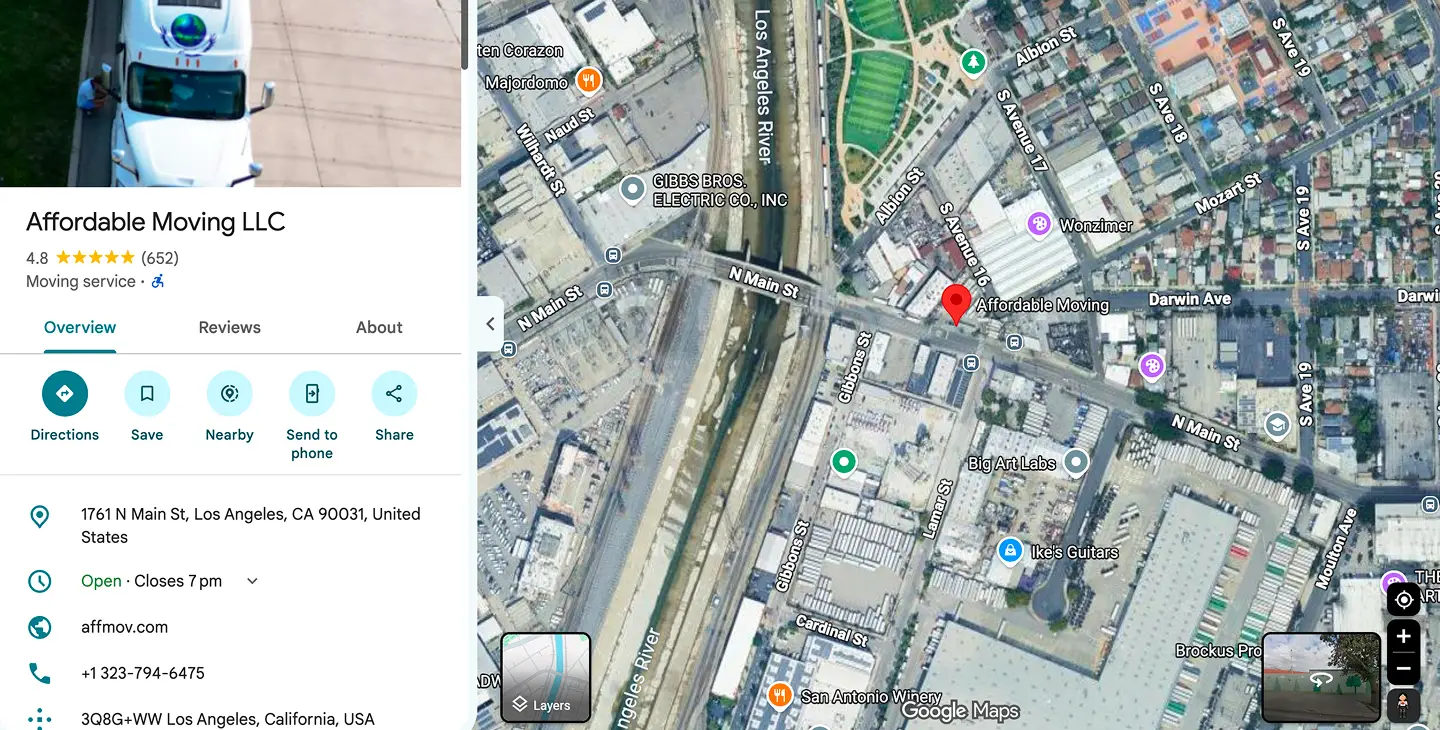
    Google Business Profile information for a local service business.

    3. Build Clear Pages for Your Main Services

    A page called “Services” can introduce your offerings, but customers often need more detail before contacting you. Create distinct pages for meaningful services: for example, residential moving, commercial moving, or packing services, if those are truly provided.

    Each page should explain who the service is for, what the work includes, what affects the process, where the service is available, and how to request an estimate. Add real photos and answers to common questions. Link related services naturally rather than repeating the same keyword in every paragraph.

    If you serve several communities, use location-specific pages only when they contain substantial, genuinely useful differences. Near-identical pages that swap city names can frustrate readers and create unnecessary site clutter.

    4. Make Contact Information Easy to Find

    Visitors should not need to search for a phone number, contact form, or service area. Show a clear contact route on mobile and desktop. Use clickable phone links and confirm that forms reach the correct person or system.

    Keep your business name, address where publicly applicable, and phone details consistent across the website and important listings. A service-area business that hides its address on Google should not publish a misleading storefront address elsewhere.

    5. Earn Reviews Through Real Customer Experiences

    Customer reviews can help people evaluate whether a business is right for them. Make it easy for real customers to find the correct review link after a genuine interaction. Respond professionally to feedback where appropriate, including criticism.

    Do not buy reviews, post fake reviews, selectively solicit only positive feedback, or offer incentives in exchange for reviews. Avoid “review gating,” where unhappy customers are discouraged from posting publicly. Follow the platform’s current policies.

    Local service professionals carrying out customer work.

    6. Check the Technical Foundations

    Local SEO depends on a website people and search engines can access. Confirm that important pages are indexable, use descriptive page titles and headings, and have working internal links. Fix broken forms, obvious mobile usability issues, and major performance bottlenecks.

    Use structured data only when it accurately represents the business and page content. A LocalBusiness schema entry is not a shortcut to rankings; it is a way to describe factual business information in a machine-readable format.

    Before a website redesign or domain migration, inventory valuable existing URLs and plan appropriate redirects. A visual refresh should not silently remove pages that customers already find through search.

    7. Measure Calls, Forms, and Useful Search Signals

    Track the outcomes that matter to your business: qualified phone calls, completed contact forms, appointment requests, and real jobs where attribution is available. Search impressions and clicks can provide context, but they are not the same as booked work.

    Use Google Search Console to review search queries and landing pages, and Google Analytics or another appropriately configured system to understand on-site activity. Google Business Profile performance reporting can provide additional signals. Make sure consent and privacy requirements are considered.

    Test conversion tracking before relying on it. A thank-you page refresh should not create a second lead event, and a form error should not be counted as a successful inquiry.

    8. Create a Simple Local SEO Routine

    Weekly: check whether forms and phone links work, review important profile changes, and respond to relevant customer feedback. Monthly: review service-page performance, update outdated content, check key business listings, and look for unanswered customer questions.

    Quarterly: revisit your main service areas, compare qualified inquiries over a meaningful period, and decide whether new content or technical improvements are justified. Document changes so you can connect improvements with actual business outcomes rather than assumptions.

    Business owner reviewing local website performance.

    Common Local SEO Mistakes to Avoid

    Common mistakes include using inaccurate business categories, publishing duplicate city pages, letting contact details drift across listings, ignoring mobile forms, treating every website visit as a lead, and expecting instant results from a single profile edit.

    A better approach is to fix foundational issues first, publish helpful information, and measure actual customer inquiries over time. Local SEO is an ongoing process, not a one-time checkbox.

    Frequently Asked Questions

    Do I need a storefront to benefit from local SEO?

    No. Many legitimate service-area businesses visit customers at their locations. Your profile setup must follow the platform’s eligibility and address-display rules.

    How long does local SEO take?

    There is no reliable universal timeline. Competition, existing visibility, website quality, and ongoing activity all affect outcomes. No provider can guarantee a particular Maps position.

    Should I create a page for every city I serve?

    Only when each page offers distinctive, useful information for customers in that area. Avoid mass-producing nearly identical city pages.

    Can local SEO work alongside Google Ads?

    Yes. Organic local visibility and paid campaigns can support different parts of a marketing plan. They require separate measurement so results are not misattributed.

    Build a Local Presence Customers Can Trust

    Start with accurate business information, useful service pages, a dependable contact process, and a realistic measurement plan. These foundations make it easier for customers to understand what you do and how to reach you.

    Nabali Development works with US service businesses on local SEO, Google Business Profile improvements, website development, and lead-generation systems. Request a preliminary review to discuss your priorities.

    Get a Free Website Audit
  • How to Build a Website That Converts Visitors Into Leads

    How to Build a Website That Converts Visitors Into Leads

    A business website should do more than look polished. It should help the right visitors understand your services, feel confident about contacting you, and complete an inquiry without unnecessary friction.

    For a local service company, a lead might be a phone call, estimate request, consultation booking, or completed contact form. The goal is not to persuade every visitor to contact you. It is to make the next step clear for people who genuinely need your services.

    Here is a practical framework for planning a website around qualified inquiries, from the first headline to the confirmation message after a form submission.

    1. Define What Counts as a Qualified Lead

    Before changing the website, define the action that matters. A moving company might prioritize requests that include the moving date and locations. A contractor may need the service type and project location. A professional services firm may prefer consultation requests with a short description of the need.

    Distinguish a completed form from a useful inquiry. The website should collect enough information for an appropriate follow-up without demanding so many details that visitors abandon the form.

    Agree internally on who receives leads, how quickly someone should respond, and what information is needed to evaluate a request. Those decisions shape the form and the page content.

    2. Make the First Screen Immediately Clear

    Your hero section should answer three questions: What do you do? Who do you serve? What should I do next?

    Replace generic language with a specific description of your service and audience. A local business should also communicate its genuine service area where relevant. Use one primary call to action, such as “Request an Estimate,” and one secondary action only when it helps visitors explore further.

    Avoid crowding the first screen with animated badges, competing offers, or unsupported claims. A relevant photograph or authentic project image can reinforce the message without overwhelming it.

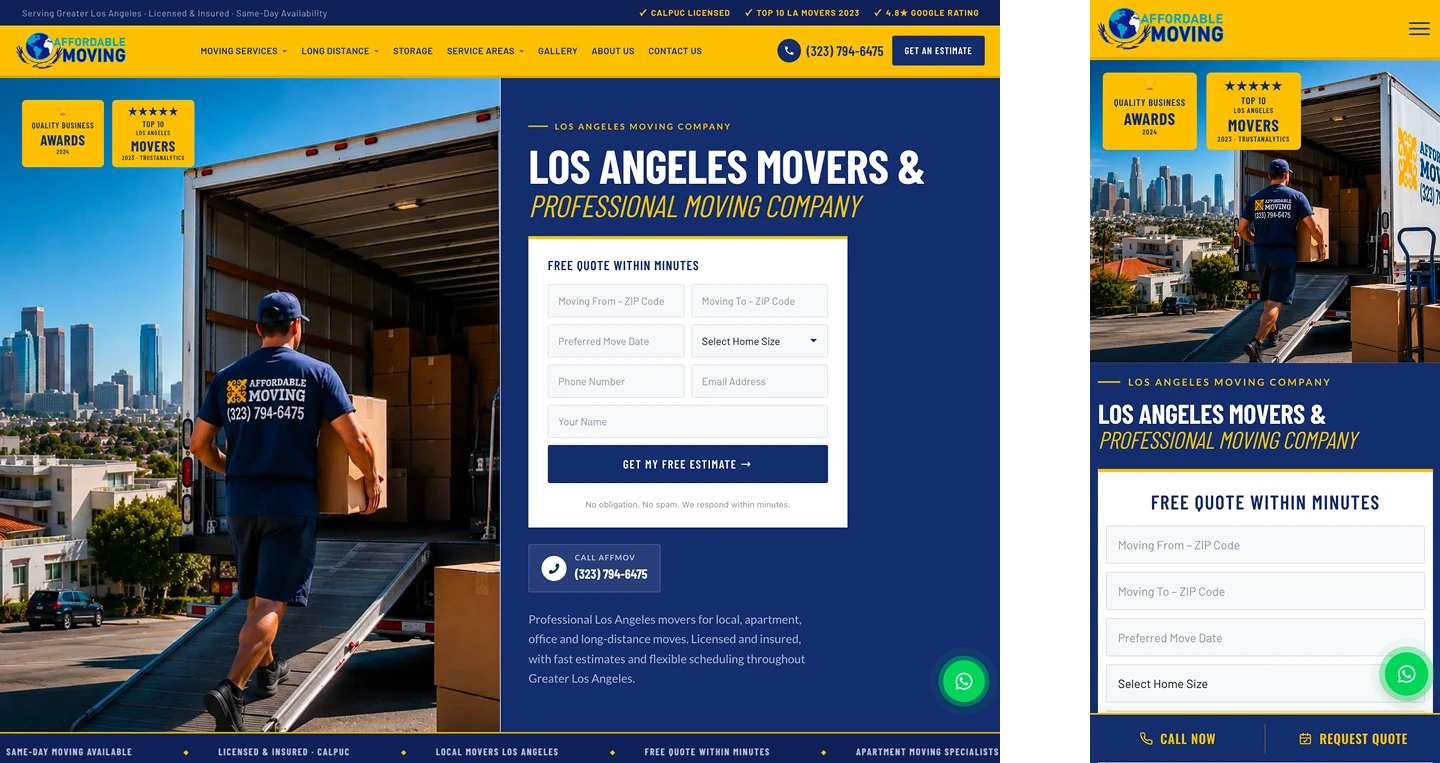
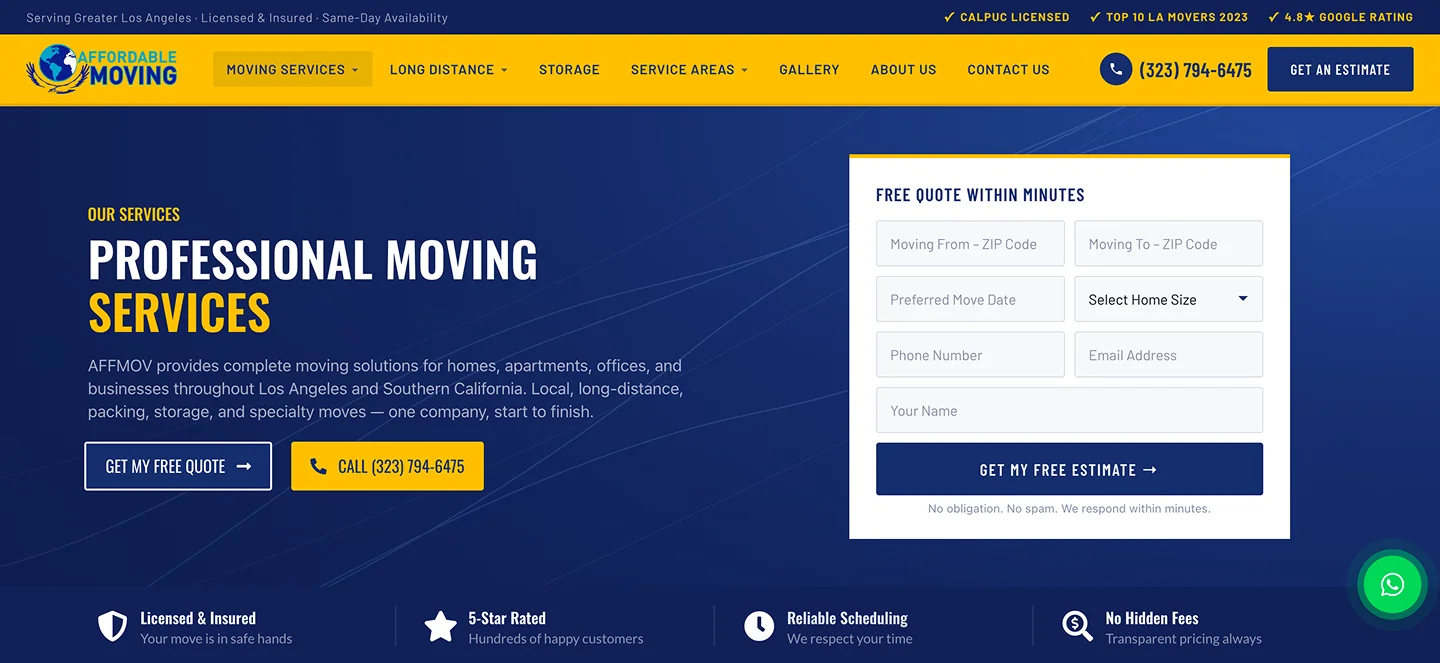
    Service business homepage with a clear headline and estimate request button.

    3. Give Each Important Service a Useful Page

    People who arrive from search or advertising often have a specific need. A page about dryer vent cleaning should explain that service directly rather than requiring visitors to navigate a generic list of unrelated offerings.

    A strong service page explains what is included, who it is for, what area the business serves, common questions, and how to request help. Use descriptive headings and natural language. Include genuine photographs or examples where possible.

    For businesses serving multiple locations, describe real service coverage accurately. Avoid publishing dozens of near-identical city pages that offer no meaningful local information.

    4. Put Trust Signals Near Decisions

    Visitors want to know whether your business is credible. Useful trust signals can include genuine project photographs, clearly attributed reviews used with permission, relevant licenses where applicable, team information, and accurate business contact details.

    Do not fill the page with anonymous testimonials or invented numbers. A short explanation of your process, a real project example, or a clear answer to a common concern can be more persuasive than an unsupported claim.

    Place evidence close to the point where a visitor is deciding whether to contact you: beside a service explanation, near a form, or within a relevant case study.

    5. Design Contact Forms for Completion and Follow-Up

    Ask only for information that helps your team respond. Name, a reliable contact method, service type, and a short description may be sufficient for many businesses. Add fields such as service location or preferred date when they materially improve qualification.

    Use readable labels, clear required-field indicators, accessible error messages, and a confirmation state that explains what happens next. Phone numbers should be tap-to-call on mobile.

    Form design is only half the job. Test that submissions reach the intended inbox or CRM, spam protection does not block legitimate customers, and errors are logged or surfaced appropriately. A form that appears successful but delivers nothing is a serious conversion problem.

    Clear website inquiry form with service and contact fields.

    6. Make Mobile Calls and Navigation Effortless

    On a phone, visitors may be ready to call rather than type. Make the phone link easy to find, keep the menu understandable, and ensure forms work with mobile keyboards.

    Test the entire journey on a real device: open a service page, locate the call to action, complete the form, and confirm the result. Look for overlapping elements, horizontal scrolling, slow-loading imagery, and buttons that are difficult to tap.

    Mobile usability is not a separate finishing step. It is part of the website’s primary customer experience.

    7. Improve Speed Without Sacrificing Clarity

    Large photographs, excessive scripts, and complex motion can make a website slower than necessary. Compress images, use suitable formats, limit unnecessary third-party scripts, and test important pages under realistic conditions.

    Use tools such as PageSpeed Insights as diagnostic inputs rather than treating a single score as the business goal. Focus on the pages visitors use to understand services and submit inquiries.

    Animations should not hide important content when a script fails or a visitor prefers reduced motion. Essential buttons and forms must remain available.

    8. Match Marketing Traffic to the Right Page

    A visitor clicking an advertisement for a specific service should land on a page that addresses that service. Sending every campaign to the homepage can create extra steps and confusion.

    Organic service pages and focused advertising landing pages can serve different needs. Both should make accurate claims, provide a clear next step, and avoid distracting navigation or content that conflicts with the visitor’s intent.

    When building campaign pages, plan how form submissions and phone calls will be attributed so that the business can evaluate which channels generate useful inquiries.

    9. Track Leads Carefully—and Check the Data

    Useful measurement starts with defining conversion events: a confirmed form submission, a qualified phone call, or another meaningful action. Avoid counting a button click as a completed lead when the form has not been submitted.

    Configure analytics and tag management with attention to consent requirements, duplicate events, and the handoff between landing pages and confirmation pages. Preserve campaign information where appropriate.

    Compare website data with actual inquiries received. If analytics reports conversions but the team receives no messages, investigate delivery and tracking before making marketing decisions.

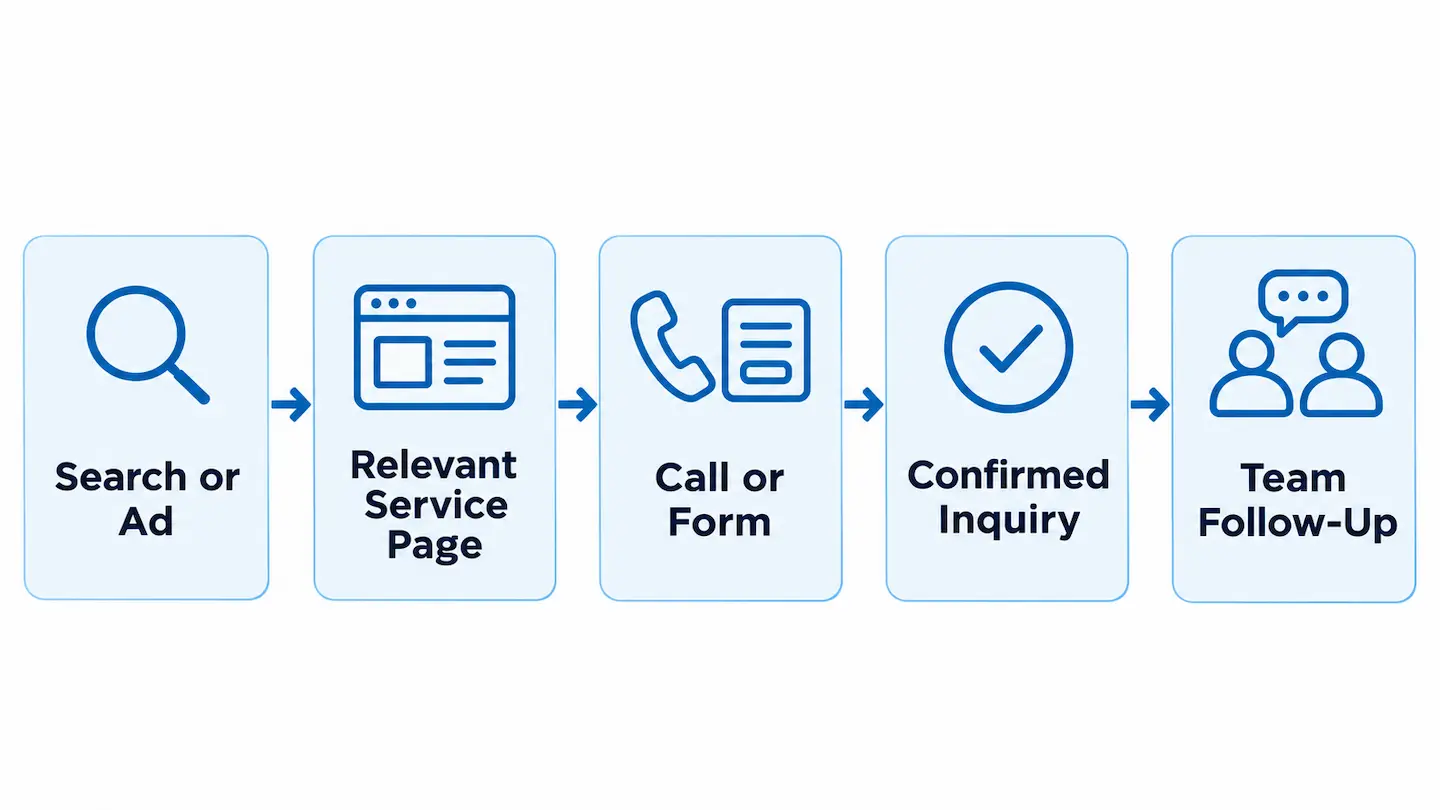
    Diagram of a website visitor journey from search to a confirmed business inquiry.

    10. Improve the Website Through Real Feedback

    After launch, review which pages attract relevant visitors, which forms produce useful inquiries, and where customers report confusion. Ask your team what information is missing from incoming requests.

    Prioritize changes that solve clear problems. That might mean rewriting a headline, simplifying a form, improving a service page, or fixing a technical issue—not necessarily redesigning the entire site.

    Use a repeatable process: identify the issue, make one meaningful change, test it, and review the outcome. Do not claim a conversion improvement without a reliable comparison.

    A Practical Lead-Generation Website Checklist

    Before publishing, confirm that the homepage explains the offer; important services have useful pages; contact details are accurate; mobile buttons work; forms deliver to the intended recipient; success messages are clear; and analytics records meaningful actions once.

    Also check the technical foundations: page titles, logical headings, internal links, accessible controls, image optimization, and indexability. If you are replacing an existing website, preserve valuable URLs and plan any necessary redirects.

    The best website is not necessarily the one with the most features. It is the one that helps the right customer take the right action reliably.

    Frequently Asked Questions

    What is a lead-generating website?

    It is a website designed to help relevant visitors take a meaningful action, such as calling, requesting an estimate, or submitting a consultation inquiry.

    Should every page have a contact form?

    Not necessarily. Every important page should offer a clear next step, but the right action may be a phone link, a short form, or a link to a dedicated contact page.

    How can I tell whether my website forms work?

    Submit a controlled test inquiry, verify that it arrives in the correct inbox or CRM, check the success state, and confirm that analytics does not record duplicate leads.

    Do I need to redesign my entire website to get more leads?

    No. Many issues can be addressed through targeted changes to messaging, forms, page structure, speed, or tracking. A broader redesign makes sense when the underlying structure prevents those improvements.

    Build a Website Around Real Customer Inquiries

    Clear content, useful service pages, trustworthy proof, reliable forms, and accurate measurement work together. Each part of the website should help customers understand your business and make contacting you straightforward.

    Nabali Development helps US businesses plan and improve websites alongside SEO and digital marketing. If your website is not producing the inquiries you need, start with a preliminary review of its content, functionality, and lead journey.

    Get a Free Website Audit
  • 10 Signs Your Business Website Needs a Redesign

    10 Signs Your Business Website Needs a Redesign

    Your website may be the first place a potential customer encounters your business. If it is difficult to use, unclear about your services, or unreliable when someone tries to contact you, the problem can affect more than appearance.

    A redesign is not always the answer. Sometimes a focused repair, clearer copy, or a better contact form can solve the issue. The key is to identify what is holding visitors back before committing to a complete rebuild.

    Here are ten practical signs to look for, followed by a framework for deciding whether to improve your current site or plan a redesign.

    1. Your Website Is Hard to Use on a Phone

    Customers often visit local business websites from their phones while comparing options or looking for a phone number. If text is tiny, buttons are difficult to tap, or a form requires horizontal scrolling, the experience creates unnecessary friction.

    Check your main pages on a real phone. Can visitors understand your services, find the contact button, and submit an inquiry without zooming or fighting the layout? If not, mobile usability deserves attention.

    A redesign may be appropriate when the underlying layout cannot adapt cleanly across screen sizes. If only one component is broken, a targeted fix could be enough.

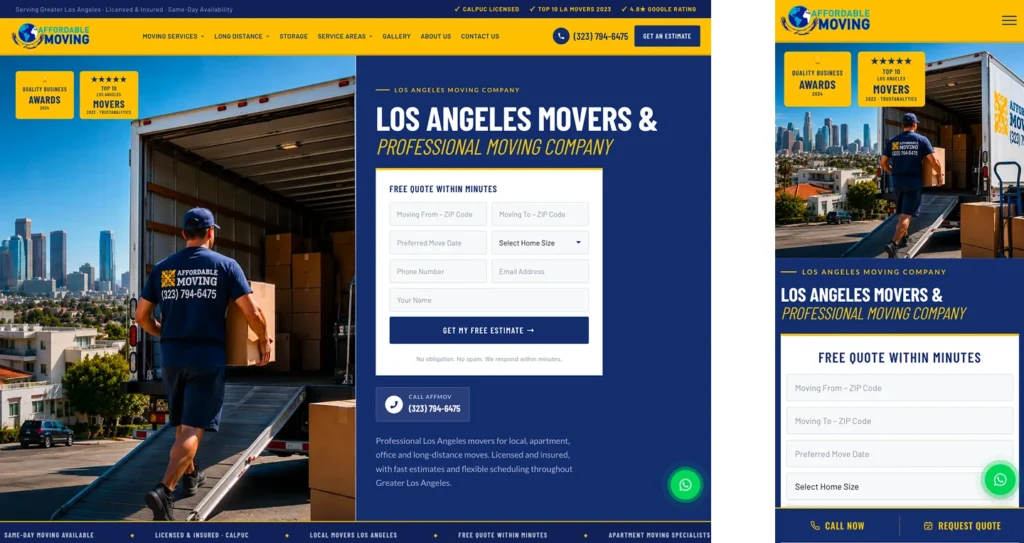
    Same business website shown on desktop and mobile devices.

    2. Visitors Cannot Quickly Understand What You Offer

    A homepage should explain who you serve, what you do, and what a visitor should do next. Vague slogans and generic claims make people work too hard to understand the offer.

    Look at your homepage for five seconds, then ask someone unfamiliar with your company to describe the business. If they cannot identify your main services and service area, the messaging needs improvement.

    Often, clearer headlines and service navigation can help without a full rebuild. But if the entire site is organized around outdated positioning, a broader redesign may be worthwhile.

    3. Important Contact Buttons or Forms Do Not Work

    A broken form can quietly prevent leads from reaching your team. Buttons may point to the wrong page, email notifications may fail, or a successful-looking submission may never arrive.

    Test the complete inquiry journey: open the form, enter valid information, submit it, verify receipt, and confirm that the visitor sees the correct success message. Test phone links on mobile as well.

    If these problems are isolated, fix them immediately. If the website has many unreliable integrations, consider whether the platform and form architecture need rebuilding.

    4. Your Website Feels Slow or Unstable

    Heavy images, unnecessary scripts, poor hosting, and complicated themes can make pages feel sluggish. Layout elements that jump while loading can also make buttons frustrating to use.

    Use a combination of real-device testing and performance tools to identify what is actually slow. Avoid judging a site by a single score without understanding the underlying issue.

    Optimization may be enough when the site has a healthy structure. A redesign becomes more compelling if the existing theme or page builder setup makes meaningful improvements difficult.

    Professional reviewing website performance and usability.

    5. Your Service Pages Are Too Generic

    A single paragraph listing every service rarely answers the questions customers have. A roofing company, cleaning service, or moving company may need separate, useful pages for its major offerings.

    Good service pages explain what the service includes, who it is for, how the process works, and how to request help. They should also reflect genuine service areas without producing dozens of near-identical location pages.

    If your website cannot support clear service-page architecture, the redesign should address content structure as well as visual design.

    6. The Design No Longer Reflects Your Business

    Businesses evolve. You may now serve different customers, offer new services, or compete in a more demanding market than when the website was built.

    An older design is not automatically bad. The issue is whether its imagery, typography, navigation, and language accurately represent the company today.

    Before redesigning, document what has changed in your positioning. That helps ensure the new site is more than a cosmetic refresh.

    7. Updating Content Is Difficult

    If adding a service, replacing a photograph, or correcting business hours requires a developer every time, the site may be creating avoidable operational work.

    A practical content-management setup lets authorized team members handle routine updates while protecting layouts and important settings.

    Sometimes permissions or training solve the problem. In other cases, outdated templates, custom code, or an inflexible editing system justify rebuilding parts of the site.

    8. Your Website Has Technical SEO Problems

    Missing or duplicate page titles, confusing navigation, broken internal links, and incorrect canonical settings can make a site harder for search engines and visitors to understand.

    Start with a crawl, review the indexable pages, and compare the site’s structure with the services you actually offer. A redesign should preserve valuable existing URLs and plan redirects carefully when URLs must change.

    Do not treat a redesign as an automatic SEO improvement. A poorly managed migration can remove useful content or disrupt search visibility.

    9. You Cannot Tell Which Pages Generate Inquiries

    Without reliable measurement, it is difficult to know whether visitors are contacting your business or where they lose interest. Tracking can include form submissions, meaningful phone interactions, and other agreed conversion actions.

    Check that analytics and conversion events reflect real actions and do not count the same lead repeatedly. Privacy requirements and consent settings should be part of the implementation plan.

    A redesign offers a good opportunity to improve measurement, but analytics can often be repaired on an existing website too.

    10. The Site No Longer Supports Your Growth Plans

    Perhaps you are expanding to additional genuine service areas, introducing online booking, launching e-commerce, or connecting a CRM. A site built for a simpler business may not support those requirements gracefully.

    List the new capabilities and assess the cost, risk, and maintainability of adding them to the current platform. The right decision depends on the actual constraints, not on whether a new design would look more exciting.

    A redesign is most valuable when it solves a business limitation and gives your team a more useful foundation for future work.

    Should You Repair, Refresh, or Redesign?

    Choose a targeted repair when a few specific problems are causing friction: a broken form, a slow image, a confusing button, or an outdated service description.

    Consider a visual refresh when the structure and platform work well but the presentation no longer fits your brand. This may involve typography, imagery, spacing, and updated copy.

    Consider a fuller redesign when problems are systemic: the mobile layout is difficult to maintain, the information architecture no longer fits the business, important integrations are unreliable, or the platform cannot support planned features.

    Whatever the approach, document your current URLs, analytics, content, forms, and key conversion paths before changing anything.

    Business owner and web designer reviewing website layout plans.

    A Practical Website Redesign Checklist

    Start by identifying your highest-priority services and audiences. Review real visitor questions, existing inquiries, and the pages that currently attract useful traffic.

    Next, create a page inventory and mark what should be kept, improved, combined, or retired. Preserve useful content and plan any necessary redirects before launch.

    Finally, test the new site on mobile and desktop, verify every form end to end, confirm analytics events, review accessibility, and check search-engine settings. A polished preview is not a substitute for functional testing.

    Frequently Asked Questions

    How often should a business redesign its website?

    There is no universal schedule. Review the site when business goals, customer needs, technology, or performance issues change. A well-maintained website can remain useful for years without a complete redesign.

    Can a website redesign hurt SEO?

    Yes, especially if valuable pages disappear, URLs change without appropriate redirects, or indexability settings are incorrect. A careful content and URL migration plan reduces avoidable risk.

    Do I need a new website if my current site is slow?

    Not necessarily. Performance problems may be fixable through image optimization, caching, script cleanup, or hosting changes. Investigate the cause before deciding to rebuild.

    What should I prepare before requesting a redesign?

    Bring your current website URL, main business goals, service list, examples of sites you like, known problems, and any required features or integrations. A partner can help turn these into a practical scope.

    Make Your Website Easier for Customers to Use

    A website redesign should make it easier for people to understand your business and take action. Start with the problems you can verify, prioritize the improvements that matter, and keep the experience clear on every device.

    Nabali Development helps US businesses with website development, WordPress support, SEO, and related digital improvements. If your current site is not meeting your needs, request an initial review to discuss the next step.

    Get a Free Website Audit
  • WordPress vs. Shopify: Which Platform Is Right for Your Business?

    WordPress vs. Shopify: Which Platform Is Right for Your Business?

    Choosing a website platform can feel like a technical decision, but it starts with a business question: what do customers need to do on your site? A local service company may need service pages, a trustworthy portfolio, and an easy way to request an estimate. A product business may need a catalog, checkout, shipping options, and inventory management.

    WordPress and Shopify can both support professional websites, but they approach those needs differently. WordPress is a flexible content management system that can be extended with themes and plugins. Shopify is a hosted commerce platform built around managing and selling products.

    This guide compares the two without assuming that one is the best choice for every business.

    Quick Answer: Choose Based on Your Primary Goal

    For a service-led website with extensive informational content, custom page structures, and flexible integrations, WordPress is often a strong option. For a business whose primary task is selling products through a managed online store, Shopify is often a practical starting point.

    That is a starting point, not a rule. WordPress can run an online store through WooCommerce, and Shopify can publish pages and articles. The right decision depends on workflows, team capabilities, and long-term requirements.

    1. What Is WordPress Best Suited For?

    WordPress is commonly used for service websites, blogs, publishing-heavy sites, and customized business websites. It allows businesses to organize pages, articles, categories, and custom content types. A broad ecosystem of themes and plugins can add forms, booking tools, e-commerce, and other functions.

    This flexibility comes with responsibility. Hosting, backups, updates, security configuration, plugin compatibility, and ongoing testing need clear ownership. A poorly maintained WordPress installation can become unreliable, regardless of how attractive its design looks.

    For a contractor, cleaning company, moving company, or other local service business, WordPress may make it straightforward to maintain detailed service pages and educational content while keeping inquiries as the primary conversion.

    2. What Is Shopify Best Suited For?

    Shopify is designed around online commerce. Its core workflows include product listings, orders, payments, inventory, and storefront management. Hosting and much of the platform infrastructure are managed as part of the service.

    This can reduce the operational burden for a business that wants to focus on products and fulfillment. However, businesses still need to configure their storefront carefully, manage apps, maintain accurate product information, and test the customer journey.

    Shopify can support a strong brand experience, but some highly customized content structures or unusual integrations may require additional development or specialized apps.

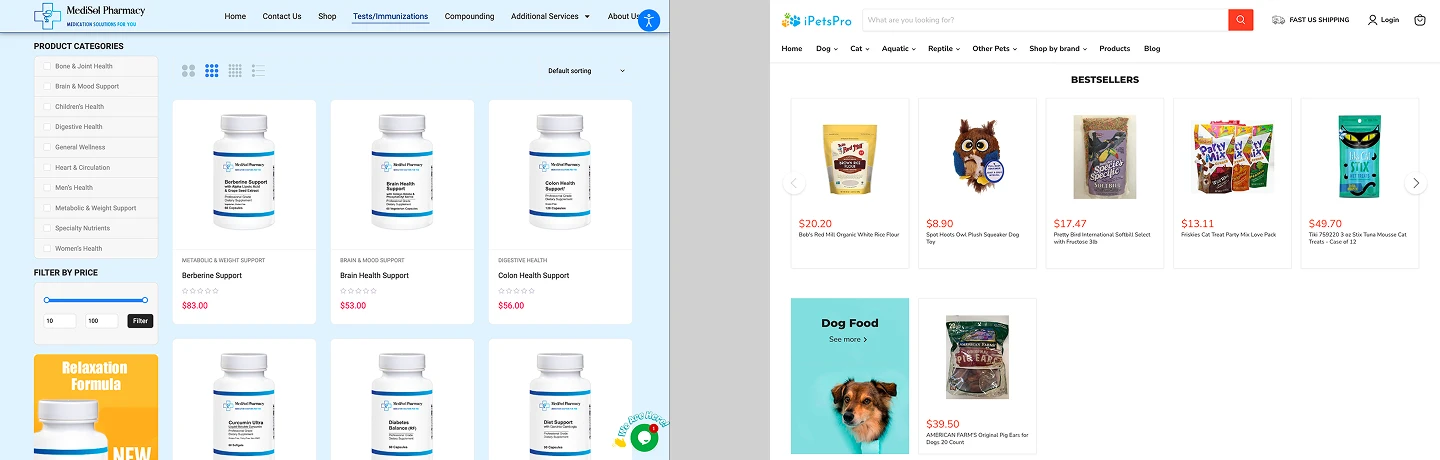
    Service website and online store shown side by side.

    3. Selling Online: Shopify vs. WooCommerce

    Shopify includes a commerce-focused administrative experience. Product management, checkout, order workflows, and many commerce features are central to the platform. The specific availability of payment methods, shipping services, and third-party integrations varies by business location, plan, and provider.

    WooCommerce adds e-commerce capabilities to WordPress. It can be useful when a company needs both a content-rich WordPress site and an online store, or when specific workflows benefit from greater control over the website environment.

    The trade-off is operational complexity. A WooCommerce store may require more hands-on management of hosting, updates, extensions, and compatibility. Neither option eliminates the need to test checkout, tax settings, order notifications, and fulfillment processes.

    Both platforms can support search-friendly websites. Neither platform automatically guarantees better Google rankings. Search performance depends on the usefulness of the content, site architecture, technical implementation, competition, and many other factors.

    WordPress is particularly flexible for businesses with many service pages, location-specific content, educational guides, and custom editorial layouts. Shopify provides tools for product pages, collections, content pages, and blog posts, making it suitable for commerce-oriented content.

    For local service businesses, accurate business details, genuine service-area information, clear internal links, and a well-maintained Google Business Profile often matter more than the platform logo in the website footer.

    Example of clear website page structure for SEO and customer inquiries.

    5. Design Flexibility and User Experience

    Both platforms offer professionally designed themes and support customization. The important question is how much flexibility your project actually needs.

    A standard business website may not need complex animations or custom software. A distinctive product configurator, unusual booking process, or specialized client portal could change the platform decision. Before committing, write down the features that are essential on launch day and those that can wait.

    Regardless of platform, evaluate the real mobile experience: navigation, readability, image loading, forms, product selection, and checkout or inquiry completion.

    6. Maintenance, Ownership, and Everyday Work

    With WordPress, the business or its provider generally manages the hosting environment and maintenance plan. This offers flexibility but requires a clear process for backups, software updates, security checks, and troubleshooting.

    With Shopify, core hosting is managed by the platform, but merchants still maintain their store content, app configurations, integrations, and operational settings. App choices and custom features can introduce ongoing dependencies.

    Ask who will own the domain, which accounts the business controls, how staff access is managed, and how content changes will be handled. The easiest platform for a developer is not necessarily the easiest one for the business owner.

    7. A Practical Decision Checklist

    Choose the platform after answering these questions:

    • Is the main goal to generate inquiries, publish content, or sell products?
    • Do you need complex product, inventory, shipping, or order workflows?
    • Will you publish many service, location, or educational pages?
    • Which integrations are essential, and are they supported reliably?
    • Who will maintain the website and train your team?
    • What must be ready at launch, and what can be added later?

    If the answers point to a service website with rich content and custom forms, explore WordPress. If the answers revolve around product operations and a managed commerce workflow, explore Shopify. For mixed or unusual requirements, map the user journey and integrations before choosing.

    Business owner and web developer discussing website platform options.

    Frequently Asked Questions

    Can WordPress be used for e-commerce?

    Yes. WooCommerce is a widely used way to add store functionality to WordPress. Whether it fits depends on the catalog, checkout needs, integrations, and available maintenance resources.

    Can Shopify be used for a service business?

    It can publish service information and accept certain types of inquiries, but businesses with primarily service-led content should compare its workflows with a content-focused platform before deciding.

    Which platform is better for SEO?

    Neither guarantees stronger rankings. Both can be optimized. The quality of content, technical setup, navigation, internal linking, and ongoing improvements matters more than choosing a platform based on SEO claims alone.

    Is it possible to migrate from one platform to the other?

    Yes, but migration requires planning. Content structures, product data, URLs, redirects, integrations, and tracking should be mapped and tested before switching.

    Choose the Platform That Supports Your Business

    WordPress and Shopify are both capable tools. The right fit depends on what you sell, how customers interact with your business, who maintains the site, and which capabilities you need over time.

    Nabali Development helps US businesses plan and develop websites, improve search visibility, and connect websites with their marketing goals. If you are evaluating platforms for a new website or redesign, we can review your requirements and discuss a practical approach.

    Get a Free Website Audit
  • What Determines the Cost of a Small Business Website in 2027?

    What Determines the Cost of a Small Business Website in 2027?

    A small business website is more than a collection of pages. It can be a place where customers discover your services, evaluate your credibility, and contact your team. That is why two websites with a similar number of pages can require very different amounts of work.

    If you are planning a new website or a redesign in 2027, the most useful first step is not to look for a one-size-fits-all package. It is to understand what your business needs the website to do, which features support that goal, and which responsibilities continue after launch.

    This guide explains the major factors that influence the scope of a small business website project, how to prioritize features, and what to ask before requesting a proposal.

    1. Start With the Website’s Business Goal

    A simple brochure website and a lead-generation website may look similar at first glance, but their requirements can differ significantly. A brochure site might primarily explain your services and provide contact information. A lead-generation site also needs a clear conversion path, carefully designed forms, useful service pages, and reliable tracking.

    Before discussing design, write down the action you want a visitor to take. For a contractor, that might be requesting an estimate. For a professional service business, it could be scheduling a consultation. For a retailer, it might be purchasing a product.

    Once the goal is clear, decisions about content, layout, forms, and integrations become easier to prioritize.

    2. The Main Factors That Shape Website Scope

    Page structure. A focused website with a homepage, service overview, individual service pages, about page, and contact page has different content and design requirements from a website with many locations, products, or resource articles.

    Content preparation. Original service descriptions, photographs, FAQs, case studies, and calls to action all require work. Reusing incomplete or generic content can make a website feel unfinished even when its design looks polished.

    Design requirements. Adapting a proven design system is different from developing a fully custom visual language with unique interactions. Both can be appropriate; the right choice depends on brand needs and visitor expectations.

    Platform and functionality. WordPress, Shopify, and custom applications solve different problems. Appointment requests, e-commerce, membership areas, multilingual content, and CRM connections can change the implementation plan.

    Quality assurance. Mobile layouts, accessibility, forms, browser compatibility, performance, and error handling should be part of the project scope rather than treated as optional finishing touches.

    Responsive small business website shown on desktop and mobile

    3. Templates, Custom Design, and the Right Level of Complexity

    A template-based approach can be efficient when a business needs a clear, familiar structure and standard functionality. Custom design can be valuable when a brand has distinctive positioning, a complex user journey, or a need for specialized interactions.

    Neither approach is automatically better. The important questions are whether the design communicates the business clearly, works on mobile devices, supports the required content, and can be maintained without unnecessary friction.

    Be cautious about adding animations or interactive features simply because they look impressive in a presentation. Every element should help visitors understand the offer or take the next step.

    4. Content and SEO Should Be Planned Together

    A website can be visually attractive and still struggle to explain what a business offers. Useful content helps people and search engines understand services, locations, and the questions customers commonly ask.

    For a local service company, this often means distinct pages for meaningful services, accurate business details, and clear descriptions of genuine service areas. Avoid creating near-identical city pages that provide little value.

    Search engine optimization is an ongoing discipline. A new website should have sound foundations—descriptive titles, logical headings, internal links, indexable pages, and technical checks—but no responsible provider can guarantee rankings.

    Example service page with clear content hierarchy and contact call to action.

    5. Forms, Tracking, and Integrations Matter

    Many businesses measure a website by the inquiries it produces. A contact form should be easy to complete, validate entries clearly, and deliver submissions reliably. A phone link should work on mobile. If the website connects to a CRM, email platform, or scheduling system, those integrations need their own testing.

    Analytics can help a business understand which pages attract visitors and which actions lead to inquiries. However, tracking must be configured carefully to avoid duplicate events and should respect applicable privacy and consent requirements.

    Ask your developer how test submissions will be verified, who receives notifications, and what happens when a form fails. These practical questions matter more than a polished form mockup.

    6. Think Beyond Launch Day

    A website needs ongoing attention. Software updates, backups, broken links, content changes, and occasional integration issues are normal operational considerations.

    Before launching, clarify who will manage hosting, domain renewals, backups, updates, and troubleshooting. Also confirm whether your team will be able to edit routine content without developer assistance.

    Planning maintenance early helps prevent the common situation where a website launches successfully but becomes difficult to update a few months later.

    7. How to Prepare a Better Website Project Brief

    Start with your business goals, target customers, and the main services you want to promote. List your must-have pages and any required features, such as estimate forms, online booking, e-commerce, or CRM integration.

    Collect examples of websites you like, but explain what works about them: the clarity of the navigation, the photography, the simplicity of the contact process, or the way services are organized. This is more helpful than asking a developer to copy another company’s website.

    Finally, identify who will provide text, photos, brand assets, access to existing systems, and feedback during the project. Clear ownership of these inputs makes the work more predictable.

    Business owner and web developer reviewing a website plan.

    8. Questions to Ask Before Choosing a Website Partner

    Ask what is included in discovery, content preparation, design, development, testing, and launch support. Request examples of comparable projects and clarify which work will be handled by the provider versus your own team.

    Confirm who owns the domain, hosting account, website content, and administrative access. Ask how changes are requested, what happens after launch, and how issues will be handled.

    A useful proposal should describe deliverables and responsibilities clearly. The goal is to compare the work being offered, not just the appearance of the final homepage.

    Frequently Asked Questions

    Does a small business need a custom website?

    Not always. A well-structured site built with an appropriate platform can serve many businesses effectively. Custom development makes sense when requirements cannot be met cleanly with standard tools.

    Is WordPress suitable for a local service business?

    Often, yes. WordPress can support service pages, forms, blog content, and many common integrations. The implementation quality, maintenance plan, and hosting setup still matter.

    Should SEO be included when building a new website?

    SEO foundations should be considered from the start, including page structure, metadata, internal links, and technical accessibility. Ongoing SEO work is a separate activity that may require additional content and optimization.

    What should I prepare before contacting a developer?

    Prepare your business goals, service list, desired pages, examples you like, current website details if applicable, and any required integrations. You do not need a finished specification to begin a useful conversation.

    Plan Your Website Around What Your Business Needs

    The right website project starts with a clear understanding of your customers and the actions you want them to take. Focus on useful content, reliable functionality, and a design that supports the business—not features that look impressive but add little value.

    Nabali Development works with US businesses on website development, SEO, Google Ads, and related digital improvements. If you are planning a website, we can review your goals and discuss a practical next step.

    Planning a Business Website?

    Tell us about your goals and the website you want to build. We’ll discuss a practical next step.

    Request a Free Website Review