When someone searches for a nearby service, a Google Business Profile can help them understand what a company does, where it operates, when it is available, and how to get in touch. For a local service business, those details can be as important as the website itself.
Optimization is not about filling every field with keywords or publishing constant updates. It starts with accurate information, a profile that reflects the real business, and a customer experience that supports what the listing promises.
This practical guide walks through the decisions that matter most, common mistakes to avoid, and a manageable routine for keeping your profile useful.
1. Confirm Ownership and Access Before Editing
Start by locating the correct business profile and confirming that the business owner has appropriate control. If an agency helps manage the listing, the owner should retain ownership and grant manager access through Google’s supported process.
Check for duplicate profiles, old addresses, outdated phone numbers, and listings created by previous employees or agencies. Do not create a second profile simply because access to the first is inconvenient.
Before making major changes, record the current business name, primary category, address or service-area settings, phone, website link, and hours. This provides a useful reference if a change requires review.
2. Choose the Most Accurate Business Categories
Your primary category should describe the business as it actually operates. A moving company should not select an unrelated category just because that category appears to have high search demand. Additional categories can describe other genuine business activities when applicable.
Review the categories against your real services, signage, website, and customer expectations. Avoid selecting categories for services you do not provide.
Category options and eligibility rules can change. Check the available options in the profile interface rather than relying on an old list copied from another article.
3. Keep Business Details Consistent and Honest
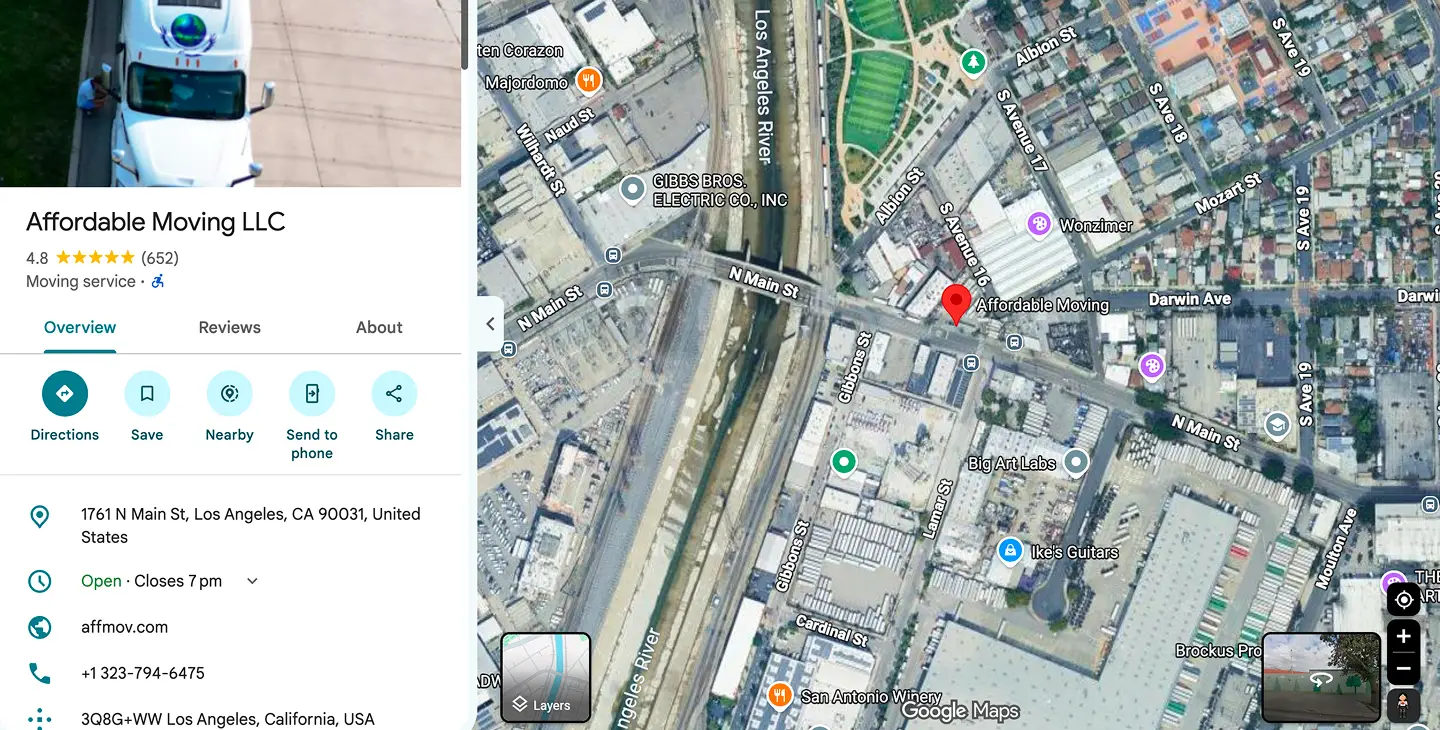
Use the real-world business name, not a keyword-stuffed version of it. Confirm that the phone number connects to the business and that the website URL leads to a useful page. Make sure regular and special hours are accurate.
Storefront and service-area businesses have different address-display requirements. A business that travels to customers may need to hide its residential address and specify its genuine service area. Do not use a virtual office, borrowed address, or fictitious location to create extra profiles.
Review contact details on the website and relevant directories as well. Consistency makes it easier for customers to recognize the same company across different places.
4. Write a Clear Business Description and Services
A helpful description explains what the business offers, who it serves, and what makes its approach distinctive. Write naturally for customers rather than repeating city names or marketing slogans.
Where supported, add individual services with accurate names and concise descriptions. For example, an air duct cleaning business may explain residential duct cleaning, dryer vent cleaning, and other services it genuinely performs.
Use the website to provide deeper information. A well-organized service page can answer questions that do not fit in a short profile description, including process, limitations, and how to request an estimate.
5. Use Real Photos That Represent the Business
Photos help customers recognize the company and understand the work. Useful options include team members, vehicles, storefronts, equipment, completed projects, and service situations—provided the business has permission to share them.
Choose clear, current photographs. Avoid stock images presented as the company’s own team or projects. Do not add fake before-and-after images or graphics that imply unverified results.
Image quality matters more than an arbitrary upload schedule. Refresh visuals when services, locations, equipment, or team information materially change.

6. Build a Review Process That Follows Google’s Rules
Customer reviews can help people evaluate a business, but they must reflect genuine experiences. Ask customers for honest feedback through a consistent, neutral process.
Do not purchase reviews, offer rewards in exchange for reviews, ask only happy customers to post, or pressure people to leave a particular rating. Avoid review gating, where dissatisfied customers are diverted away from the public review process.
Respond professionally when appropriate. Thank customers for useful feedback, address concerns without exposing private information, and avoid arguing in public. A clear review request link or QR code can make the process easier, but it should never be used to manipulate ratings.
7. Connect the Profile to Useful Website Pages
Your website and profile should reinforce the same business information. Ensure the linked page loads correctly on mobile, identifies the business clearly, and offers a reliable contact option.
Service businesses benefit from useful service pages and accurate descriptions of the areas they actually cover. Avoid publishing dozens of near-identical city pages that exist only to capture search traffic.
Make sure forms deliver inquiries and that click-to-call buttons use the correct number. A visitor who finds your profile but cannot contact the business may never become a lead.
8. Use Updates and Questions When They Help Customers
Business updates can be useful for announcing a new service, seasonal availability, a genuine project, or important changes. Publish information customers would reasonably care about; posting every day is not a requirement for a useful profile.
Review questions and answers where available and correct outdated or misleading information through the supported interface. Do not seed fake customer questions to make the listing look busy.
Check that special hours and temporary changes are reflected promptly. For many customers, accurate hours are more valuable than another promotional post.
9. Measure Actions, Not Just Profile Views
Look at available profile performance information, such as calls, website interactions, and other supported customer actions. Interpret trends carefully: changes in seasonality, advertising, customer demand, and Google’s reporting can affect the numbers.
Use consistent comparison periods where possible. If you add tracking parameters to a website link, make sure the final URL works and that analytics is configured to record the visit appropriately.
Do not treat a rise in profile impressions as proof of new customers. Compare visibility data with actual inquiries and booked work when reliable business records are available.

10. A Simple Monthly Google Business Profile Checklist
Confirm that the name, categories, phone, website, hours, and service areas are still accurate. Review new customer feedback and respond where appropriate. Check whether photos and service descriptions still reflect the business.
Test the website link and contact paths. Look for duplicate listings, unexpected edits, and relevant account notifications. Review available performance information and note meaningful changes rather than reacting to every daily fluctuation.
If you manage multiple locations, verify each one independently. Each eligible location should have its own accurate information; do not create extra profiles for cities where the business has no qualifying presence.
Common Google Business Profile Mistakes to Avoid
Common mistakes include keyword-stuffing the business name, using an ineligible address, selecting unrelated categories, displaying incorrect hours, leaving old phone numbers active, and publishing generic photos that do not represent the business.
Another mistake is expecting a single profile edit to guarantee placement in Google Maps results. Local visibility depends on multiple factors, including relevance, distance, and prominence, and no agency can promise a specific ranking.
Frequently Asked Questions
Is a Google Business Profile free?
Google provides the basic Business Profile listing without a listing fee. Businesses may still choose to pay for separate professional services or advertising.
Can a service-area business have a Google Business Profile?
Eligible businesses that visit customers at their locations can generally use a service-area profile. The setup must accurately reflect the way the business operates and comply with Google’s eligibility rules.
How often should I update my profile?
Review key information whenever something changes and perform a regular accuracy check. Publish photos or updates when there is genuinely useful information to share rather than following an arbitrary frequency.
Will optimization guarantee a top-three Google Maps ranking?
No. Optimization can improve the accuracy and usefulness of your business information, but placement is determined by Google’s systems and cannot be guaranteed.
Make Local Search Information Work for Your Customers
A useful Google Business Profile starts with accuracy and continues with clear services, genuine photos, an ethical review process, and reliable contact options. These fundamentals help customers decide whether your business meets their needs.
Nabali Development helps US service businesses review Google Business Profile information and strengthen the websites that support local discovery. If you would like a preliminary review of your local presence, tell us about your business and service area.
Get a Free Website Audit